How to Make a Drake Burning Bridges AI Video
Make a Drake Burning Bridges AI video from one photo, choose the 15- or 29-second party cut, and check the lead face and audio before posting.
To make a Drake Burning Bridges AI video, upload one clear photo of the person you want at the center of the party and open the Burning Bridges template. Choose the 15-second cut or the longer 29-second scene, then check your face through the moving, low-light shot. The result is a fictional edit, not a new Drake performance or an official video.
One person takes the lead, not the whole room
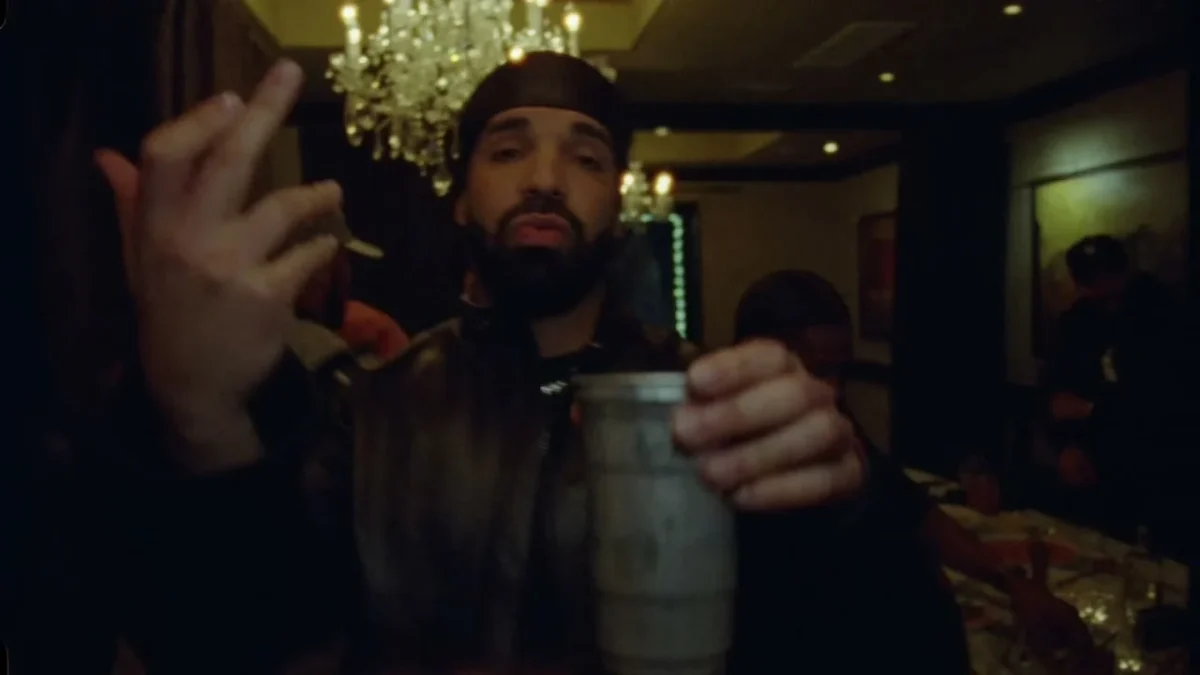
The template’s source preview follows a lead performer holding a silver cup, gesturing toward a handheld camera in a dim banquet room. A crystal chandelier hangs behind him; guests remain around the room. It’s a busy background. Your single upload is meant for the central person, not the crowd, and the party is part of the reference scene rather than a location you need to photograph yourself.
The poster is a frame from that source footage, not a personalized result. It shows the lead close to the lens, cup prominent, with other people visible behind him. Look closely. Don’t use it as proof that your generated face will stay perfectly recognizable in every frame. The camera moves, the lighting is warm and dark, and the foreground hand can briefly compete with the face for attention. Watch the actual export.
There’s no need to stage a party in your input image. A clean photo is more useful than a blurry event selfie, especially when the result already has guests and chandelier light. The joke is seeing someone you know suddenly leading this elaborate room. Let the scene supply the scale.
Give the lead a face the camera can hold
The live form has one required Your photo slot. It asks for one person with a visible, well-lit face, ideally framed from the upper body. That subject replaces the central performer. No second upload is offered for the guests, so don’t promise to cast friends around the table with this template.
The page says the person’s face and hair come from the upload, as does the outfit. It also says the original lead’s durag and beard don’t simply transfer; neither do his jacket or chain. If a particular jacket is the whole joke, wear it in the source picture. Bring your own look. Don’t assume the reference wardrobe will dress you. Pick a single-person photo without a hand covering the mouth or sunglasses hiding the eyes; a moving camera in a dark scene is already asking the face to do enough work.
Permission matters here. The form asks you to confirm you own the photo or have clear consent and that you won’t use it to impersonate someone. Use your own image, or ask the person before uploading theirs. A caption can make the fictional casting obvious without pretending the person really appeared in Drake’s music video.
The banquet room and crowd are source-scene elements; so are the silver cup and camera movement. Your photo doesn’t need to include props. No cup required. It should make the lead’s identity readable when the cup comes into the foreground. If an output gives the lead a new accessory or changes the outfit unexpectedly, judge the finished video rather than the attractive still at the start.
Choose the cut before you generate
- Open the Drake Burning Bridges video template and upload one clear photo of your consenting lead. An upper-body shot with visible shoulders fits the scene’s close handheld framing.
- Choose 15 seconds for a tighter clip or 29 seconds for the full party sequence described on the page. Both versions start at the same point. Pick the length for the story you actually want to post, not just because a longer file sounds better.
- Select one of the resolutions shown in the form, review its current credits and generate. The form offers 480p or 720p. A sharper export may help with the dim room, but don’t claim a resolution can fix a bad source photo.
- Watch the entire generated file. Check the lead’s face when the camera shifts, the hand near the cup, and the outfit as the scene progresses. The page notes a two-step generation process and says you can find the result in your Library after it finishes. Don’t treat the source preview as that result.
The form fixes the frame at 16:9 horizontal. This is not a native vertical dance template. Don’t force it. If you repurpose it for a tall feed, avoid an automatic center crop that removes the cup, chandelier or guests on the sides. A 16:9 clip inside a vertical canvas with deliberate spacing can keep the room legible. Preview the phone version before you write captions across the subject’s face.
The page labels the form source audio and describes a song in the reference scene. That doesn’t guarantee what audio will be present or licensed in your particular downloaded export. Listen to the finished file before scheduling a post. If you need replacement music, use a track your account is permitted to use on that platform; don’t imply that access to the video template grants music rights.
Let the caption frame the fiction
A useful hook gives the lead a reason to be in the room without pretending the clip is documentary footage. “My friend said they don’t go out anymore” works with the crowd reveal. Or make the silver cup the gag. Keep the caption shorter than the clip; the moving camera already does a lot of storytelling.
This is an independent AI-generated edit using a scene associated with Drake’s Burning Bridges video. It isn’t endorsed by Drake, the people in the source footage or its makers. Don’t label the post as a leaked official cut, don’t claim the real performer approved your version, and follow your platform’s AI-media disclosure rules. Get consent from the person whose face you put in the lead role.
If you want a tighter party performance built around a different source action, the Cheba Man Techno Dance guide takes a dance-edit angle. Burning Bridges asks you to protect a close face in low light while the cup and guests keep moving. Pause on the moment the cup crosses the foreground. If it hides the face for too long or your subject changes appearance after the camera shifts, choose a cleaner portrait and rerun before publishing.