Shirt-to-Jacket Uncle Trend: Save the Reveal
The Shirt-to-Jacket Uncle trend works because the shirt changes shape mid-dance. Set up your AI version without covering or spoiling the reveal.
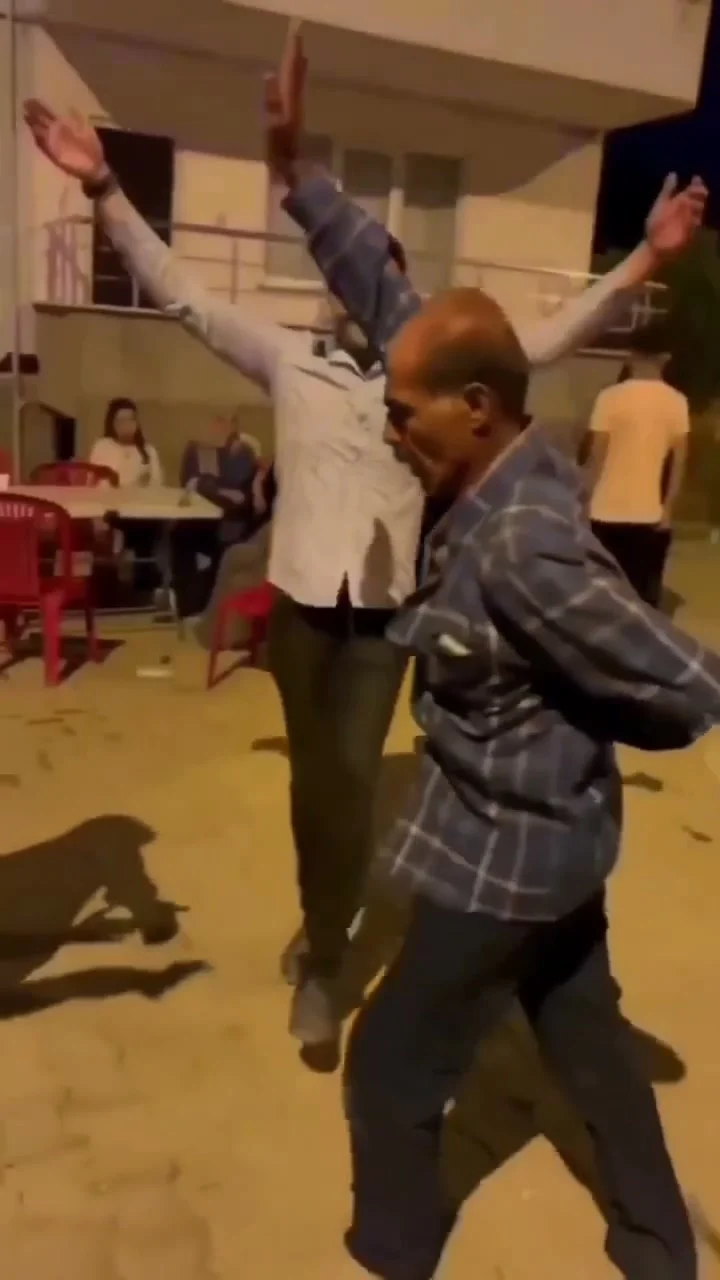
The Shirt-to-Jacket Uncle clip has one trick: a plaid shirt starts hanging like a jacket while its wearer dances at a wedding. To post an AI version without killing the joke, set up the person in the opening seconds, then let the shirt movement land on its own. Do not announce a costume change that never happens.
The reveal is a movement, not an edit
In the Shirt-to-Jacket Uncle source preview, the dancer begins in a blue plaid shirt at an open-air wedding. As he raises his arms and moves, the loose shirt bunches at the shoulders and falls open. It starts reading as a jacket. The reference is a continuous 17-second handheld shot, not a before-and-after cut. No cut. No magic flash. That distinction matters more than any transition you could add later, because a transition would ask viewers to look away at the exact moment the shirt moves.
Think of it as a visual misread that gets funnier once your eye catches up. If your caption says “watch him change outfits,” people will expect a swap and miss the fabric trick. Try a setup that keeps the payoff open: “He said he did not pack a jacket” or “Uncle heard the music.” Let the shirt talk. Weird sentence, correct edit.
The setting does some of the work. There are other people at the wedding; one dancer stays in the center of the gag. You do not need to explain every guest. And no, you do not need to buy a plaid shirt for your source photo. The reference clip supplies that look.
Pick the person whose reaction makes sense
One image replaces the dancing uncle in the Trendai version. This works as a family-group-chat bit when the person in the photo would plausibly own the dance floor. A very formal headshot can be funny too, but the audience needs to recognize the face before the shirt starts doing its thing.
Use a clear, front-facing image with one person in it. If it is a group photo cropped down after the fact, look for a cleaner frame instead. When the dancer dips and turns, there is already enough movement competing with the face. A soft, filtered portrait adds one more reason for the viewer to squint. Squint test: fail. Not ideal on a phone.
Get the person permission before uploading their image, even if you think they will laugh. A private preview is not consent to publish it. If you are making the video of yourself, you still need to decide whether the family context belongs in the caption. The wedding guests in the reference are not actors in your joke; do not invent names or tag strangers to make it feel more personal.
Keep the hook out of the way
The clip starts with the dancer close enough to see the shirt, then gives him room to move. Put a short setup over an empty patch of background or in the post caption, not over the shoulders where the shape changes. Check the text after the arms go up. If it crosses the plaid fabric just as the jacket illusion happens, you covered the punch line. Nice work, editor.
Resist the urge to add a fake flash, jump cut or “after” title card. Those cues tell the viewer to watch for an effect between frames. Here the funny part happens inside one shot. Play the export straight through before editing and mark the point where the shoulders first look wider to you. That is where the viewer should still be watching the dancer, not reading a block of explanation.
For a profile-grid cover, choose a frame where the shirt hangs open and the face is still clear. An opening-frame cover shows an ordinary plaid shirt, which gives away none of the reason someone might tap. The best cover does not have to prove the whole transformation; it should make somebody curious about why that outfit looks a little wrong.
Say what the viewer is seeing
If you post the generated clip, describe it honestly as an AI version of the wedding dance. Do not write a caption that implies the person in your photo really attended that event. YouTube guidance on realistic AI alterations specifically calls out making a real person appear to do something they did not do, and says creators must disclose qualifying content during upload. Check the disclosure controls on whichever platform you use.
You can test two caption angles without changing the video: one about the person you cast, another about the shirt. Keep the actual post honest either way. If you want an unrelated dance with a very different pacing problem, the Frozen Dance posting piece tackles song-led timing; this one depends on watching a single piece of fabric fool your eyes. Start your caption with the person, then step back and let the sleeves handle the rest.