Power Slap Battle AI Video: Cast Both Sides
Make a Power Slap Battle AI video from two portraits. Cast the right and left roles correctly, review the edit and keep the joke fictional.
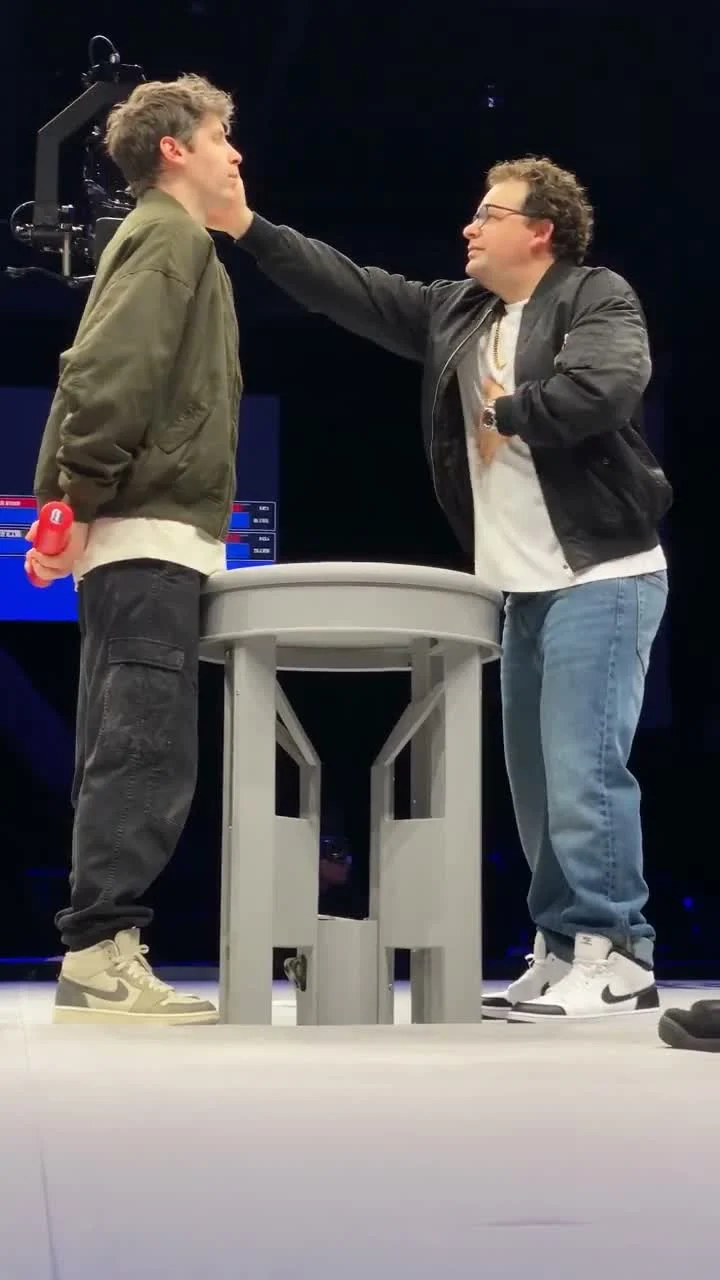
Two people face each other across a small stage table. The person on the right delivers the slap; the person on the left takes it. For a Power Slap Battle AI video, upload one clear portrait for each role in that order, then let the reference clip supply the action. No one needs to hit anyone for real.
Cast the left and right sides before uploading
The Power Slap Battle template has two required photo slots. Image 1 replaces the person delivering the slap on the right of the video. Image 2 replaces the person receiving it on the left. That isn’t a minor detail: if you swap the portraits, you change who is in each role. Ask both people what they are comfortable appearing to do before you put their faces into the edit. Ask before uploading.
Watch the source preview before choosing pictures. The cover shows a brightly lit stage, a table between the two people and a face-to-face moment that reads at a glance. The source video is a reference clip, not proof of what your version will look like. Its motion, camera, timing and audio provide the scene; your photos provide the faces. Two faces. Two jobs.
Start with a joke that both people are in on. A caption about losing the last slice of pizza is one thing. Turning a real argument into a clip of a friend getting hit, without checking with them first, is quite another. The edit can be playful, but the consent part isn’t optional. That’s the deal.
The Central Cee Doja casting guide is another example of assigning two separate faces before making the clip.
Choose portraits that can carry a reaction shot
The template asks for a well-lit image of one person with a clearly visible face in each slot. A straight-on portrait works better than a group photo because there is no guessing which person you meant. Skip pictures with a hand across the face, heavy sunglasses or a face partly cut off by the frame. Keep faces visible.
You don’t need matching outfits or a shot of both people together. These are separate roles in an existing scene. What you do need is consistency: use current photos that the two people would recognize as themselves, not a tiny screenshot of an old party photo. If the receiver’s portrait is soft or blurry, the reaction is harder to read once the video moves. Faces matter here.
Think about who should be on screen at the moment of impact. Then label your two photos in your camera roll before uploading: "right, delivering" and "left, receiving." It’s a small habit that prevents the edit from casting the wrong person in the wrong place, particularly if both friends sent you similar-looking portraits in the same chat and your phone saved them minutes apart. Your group chat will notice.
Generate the scene and check the result
- Open the Power Slap Battle page and play the reference video so you can see where each person stands.
- Upload the right-side person’s portrait into Image 1, the "Delivering the slap" slot. Check that only one face dominates the photo.
- Put the left-side person’s portrait in Image 2, the "Receiving the slap" slot. Don’t rely on the filenames alone; read the slot labels before generating.
- Pick a resolution and review the displayed credit cost. The page shows 480p and 720p options and lists the clip as roughly 18 seconds in a 9:16 format.
- Generate, then watch the full export before sharing. Check both faces at the start and around the contact moment. If a role looks wrong, fix the photo order instead of covering the problem with text.
A quick preview on your phone matters more than a dramatic caption here. If the edit feels too real or too harsh to the people in it, don’t post it. Stop there. Make a different joke with a different template from the trends gallery. There’s no reason to turn a friend into a punchline they never agreed to.
Keep the joke fictional when you post
A caption like "Who ate the leftovers?" can explain the setup without pretending this was an actual match. Don’t describe the slap as a real event, and don’t challenge viewers to copy it. This is an AI face-swap-style scene built from a source clip and two portraits. The people in your upload didn’t film that moment together.
Platform context matters too. YouTube’s violent-content policy notes that dramatized violence is assessed differently when the video or its description makes clear that it is fictional. YouTube’s altered-content guidance also requires disclosure for realistic AI scenes that show a real person doing something they didn’t do. Read the controls for the platform you’re using before you publish; an "AI edit" label in the caption helps viewers, but it may not replace an in-app disclosure setting.
If you do use the clip, send the draft to both people first. Let the receiver see how the reaction plays before anyone else does. Ask directly. That one message can save a very awkward follow-up.