Car Dance Duo AI Video: Cast Both Front Seats
Make a Car Dance Duo AI video with two portraits in the correct seats, then keep both faces in frame for the shared performance and hook.
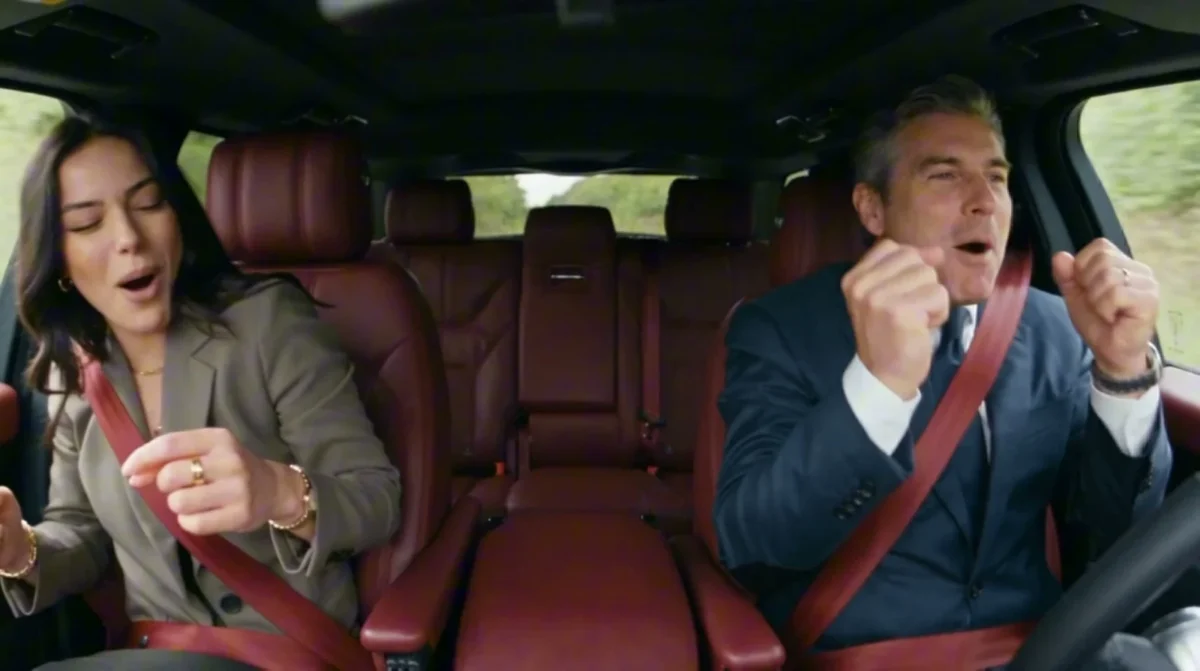
A Car Dance Duo AI video puts two people in the front seats of a car for a shared, soundtrack-led performance. The Trendai template requires two separate photos: Photo 1 becomes the person in the left seat, and Photo 2 becomes the driver on the right. The hook is the chemistry across the center console, not a complicated choreography lesson.
Pick two characters the viewer can read instantly
The source preview shows a wide view into the car cabin. The passenger on the left and the driver on the right move to the music, each visible in their own half of the frame. The poster catches both performers mid-groove with red seat belts across their clothes. Both faces matter. That’s the edit’s advantage: you can see the contrast between two reactions without waiting for a cut.
Choose an actual duo with a reason to share a moment: siblings with very different energy, two friends on the way to dinner, or the person who always takes over the aux cord with their reluctant co-pilot. Those are caption premises, not claims about what happened in the reference footage. The screen should explain the relationship quickly. If your caption names one person and ignores the other, you waste half the shot.
Because the cabin is viewed wide, small details can get lost. Pick portraits with one person in each, face unobstructed and enough light to see the eyes. Similar camera angles for the two inputs can make the pair feel less jarring even though the template handles the motion. Don’t assume the generator copies the clothing from the portraits; the page promises your faces in a built-in performance, not an exact wardrobe transfer.
Seat assignment is the storytelling decision
The form labels on the template page specify Photo 1 in the left seat and Photo 2 as the driver on the right. Both uploads are required. This isn’t an optional extra angle of the same person, and the workflow doesn’t ask you to upload a car photo. If the setup depends on one friend always being the driver, upload that friend’s face second. Otherwise the caption’s casting and the picture can argue with each other.
The page calls the video a hosted workflow with a built-in trend soundtrack. Its preview is explicitly the supplied reference footage, not a generated example. No personal result yet. Output settings follow that workflow, so don’t promise an editable duration, a vertical export toggle or a particular lyric cut. The preview player is displayed in a wide, roughly 16:9 shape. Review the file you receive before you choose any crop for a platform. A two-face clip has very little room for careless zooming.
Unlike the Hotel Lobby two-person edit, the staging here is side by side inside a car. Your input order maps to seats, not to whoever sings first. And unlike a single-subject driving montage, neither person is background decoration. Cast and caption them as a pair.
Generate once, inspect both sides
- Open the Car Dance Duo template. Put the passenger’s clear portrait into Photo 1, on the left. Put the driver’s clear portrait into Photo 2, on the right.
- Confirm you have permission to use both likenesses. Generate from the two-photo form, then save the finished video when it’s available. The preview only tells you the scene and timing it follows.
- Play the output all the way through, once looking at each side of the cabin and once looking at both people together. Check faces, seat belts and hand movements before you publish.
The beat can hide a visual mistake when you first watch. Mute for one pass. Does the person in the driver’s seat look like the second photo throughout? Is the passenger still recognizable when leaning or moving? Check the hands too. Look for hands crossing the steering area in a strange way. Don’t call a mismatched seat assignment a creative choice if the caption explicitly says who drives. Changing the source portrait or switching the two uploads is a cleaner fix than rewriting a confusing story around the mistake.
This is a staged AI performance, not evidence of a real road trip. If a caption mentions driving, keep it playful and don’t suggest filming a dance while operating a vehicle. Two people appearing in a moving-car scene can invite a literal reading. A clear AI label and both subjects’ consent help keep the joke from being mistaken for a candid clip.
Hook both people before you crop
"Me and the friend who knows every word" gives the audience two roles to read before the song starts. Another angle is "When the passenger finally gets the aux." In either case, write the first line to fit above or below the cabin, not across a face. A hook that requires three screens of text will compete with the duo rather than set it up.
Test a horizontal version first. If you’re placing it on a 9:16 canvas, keep the full-width car shot inside the vertical frame and use the spare space for the hook or a small second line. Zooming until the passenger vanishes leaves the driver dancing alone, which isn’t this template’s point. Browse the trends gallery if you want a source shot built vertically instead of trying to turn every wide duo into a tight selfie.
Pick a cover frame where both expressions are visible. The moment when their moods differ is often more legible than a frame where both mouths are open at once. After export, play your chosen upload crop on a phone before publishing; the caption should identify the two seats while both faces remain on screen.