How to Make a G-Class Champagne Shoot AI Video
Make a G-Class champagne shoot AI video from one photo, with tips for the roof-scene likeness, fictional bottle shot, audio checks and posting.
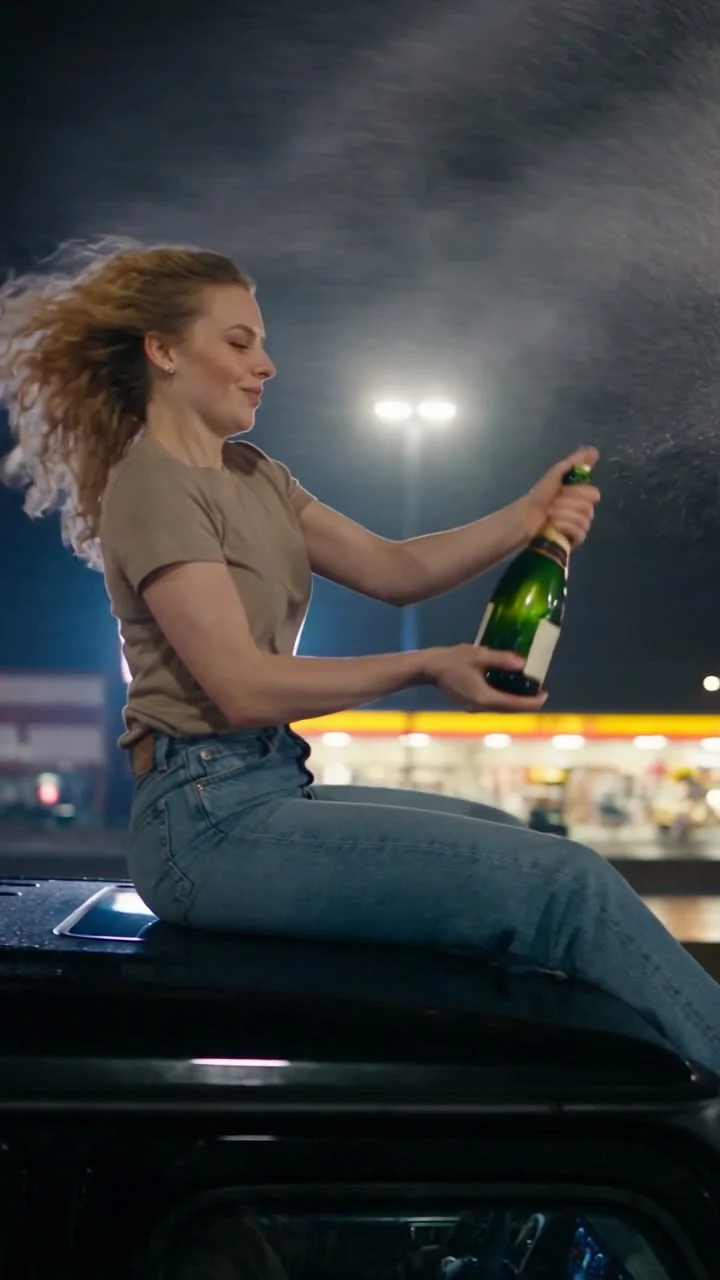
The G-Class champagne shoot AI video puts one person on the roof of a black SUV for a night-drive celebration that ends with a fictional movie-style bottle shot. To make it, upload one clear photo of a consenting adult to the G-Class Champagne Shoot template, then review the face and bottle action, then listen for the effects and check the last car shot before you post. It’s an edit, not a stunt to copy.
The shot is doing a lot in nine seconds
The live template page describes a night sequence: a person on the roof of a black G-Class pops champagne, drinks, tosses the bottle, and hits it with one simulated shot before the car pulls away. That last beat is movie logic. Don’t present it as a real driving or firearms stunt, and definitely don’t try to recreate it on a road.
The source reference is a clip, not footage that gets pasted into your new video. The page also shows a labeled sample output made with example input and a separate poster still. They tell you what the template is aiming for; neither shows how your own face will hold up when the character turns or the bottle crosses the frame. The poster catches a person holding a green bottle on top of a dark vehicle at night. It doesn’t show the whole action.
The tricky part isn’t getting a fancy car into frame. It’s making the roof character read as the same person through a fast run of close-up gestures, then letting the retreating car end the scene cleanly. Treat the first couple of seconds as your recognition window. If the face is already hard to see in your upload, the splash won’t rescue it. Neither will a profile turn.
One photo casts the roof character
The current form has a single required field, “Upload a clear photo of the main character.” It asks for one adult who agreed to appear, alone, with a visible face. There isn’t a second photo slot for a driver, bottle, car or friend. The site’s homepage card may show a different photo count; follow the actual form on the template page when you’re uploading.
Pick a waist-up image if you’ve got one. You want enough clothing visible to give the generated outfit a direction, but not so much distance that the face becomes a tiny dot. A slight three-quarter angle can work; a hard profile makes the later head turn a harder match. Skip sunglasses and a heavy beauty filter. They hide the features you’re asking the video to carry.
Look at the edges, too. Hair that blends into a dark wall can disappear against the nighttime road scene, and a hand or bottle covering half the face gives the generator a poor starting reference. Even light and a plain background matter more here than a dramatic pose. The source performance already supplies the drama.
The form lists about nine seconds, a vertical 9:16 frame and 720p output. It also says “effects + music.” Those are settings for the intended render, not evidence that any particular personalized export came out perfectly. The page’s generic directions elsewhere mention a smaller upload limit than the live form, so check the actual upload field before shrinking a good photo for no reason.
Build the post around the fake-out, not a fake claim
This is a better “my Friday-night plans in my head” post than a straight car advertisement. The opening bottle pop gives a recognizable setup; the impossible roof-and-bottle finish is the punch line. A caption such as “The group chat after one good idea” frames it as fantasy without insisting you actually rode down a highway on the roof.
I’d avoid making this a product demo. The bottle moves too fast for a label to carry the story, and the car is a dramatic setting rather than proof of ownership or a manufacturer tie-in. If you mention G-Class or G-Wagon, describe the visual reference, not an official Mercedes campaign. Use your own or licensed imagery and audio for anything you add in the posting editor.
The older Champagne Smash guide covers a different setup: a bottle on a bench, a bat swing and an optional replacement bottle image for a brand-style edit. Here the bottle goes airborne, the car moves through the night and the live form accepts only the one identity photo. That difference matters if you’re choosing between a product-centered post and a fictional action gag.
Put your caption where it won’t cover the bottle or the person’s face on a phone screen. A short setup at the start can work. Then let the pop and the toss read without another wall of text; the viewer has only a few seconds to figure out the geography of the shot. You can browse other Trendai trends for a quieter celebration scene if the simulated shot is wrong for your audience.
Check the export before it leaves your camera roll
Watch once without looking at the caption. Can you tell who the person is before the spray? Does the bottle leave their hand, and does the fictional impact land on the bottle rather than somewhere random? Check whether the roof and vehicle stay consistent, and whether the face still reads across the turn and the pull-away. If a frame makes the person look unrecognizable, don’t sell the result as a faithful likeness.
Listen on your phone and with headphones. The template page describes synchronized effects and a mixed music clip, but the source preview’s audio and a stated output pipeline aren’t a listening test of your export. Check that the pop and impact actually sound right, then listen to the ending in the downloaded file. If you replace music in TikTok or Reels, use audio you’re allowed to use there, and don’t assume the source clip’s rights transfer to your post.
Get the pictured person’s consent before using their photo, even if the joke is among friends. Label the video as AI-generated or fictional when viewers could mistake it for a real stunt, and use the platform’s AI-content disclosure controls where required. The strongest last frame is the one where the car disappears and the joke lands, not a caption pretending someone fired a real shot from a moving roof.