Mind Enterprises Balcony Trend: Cast the DJ Duet
Make the Mind Enterprises balcony trend feel like a real two-person bit with smarter role casting, cleaner captions and a sound-rights check.
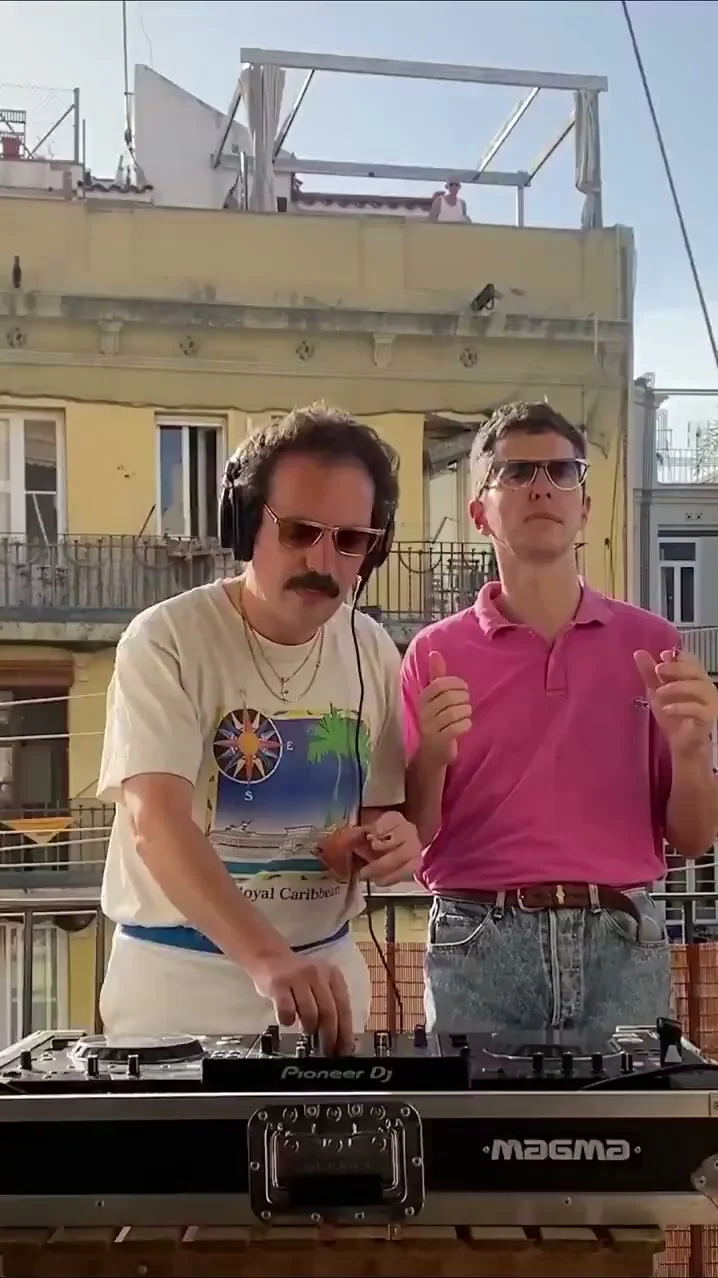
The Mind Enterprises balcony trend is a two-person DJ scene: one person stays busy at the decks while the other makes the groove visible beside them. To make an AI version that still feels like a duet, cast the roles before you pick photos, then build your caption around what each person is doing. The chemistry is the point. Two roles. One frame.
Cast the pair, not two interchangeable faces
The Mind Enterprises balcony template puts one person on the left at the decks and a dancer on the right. The source preview shows a sunlit balcony, a yellow building behind it and a fixed view of the two performers. That visual split gives you a ready-made joke: the friend who acts like the set is a serious job beside the friend who absolutely does not.
Don’t pick two photos just because you like both pictures. Pick two people whose roles a viewer can understand without a name tag. Maybe the one who plans every detail gets the headphones, and the one who turns up late gets the dance spot. If both people are performing for the camera in your source images, the resulting pairing can feel like a poster instead of a shared moment. Give the left person a calm look and the right person some attitude. Let them clash.
This is also an easy format for a roommate bit. The DJ can be the person controlling the aux cable; the dancer can be the friend who never gets to choose a song. Put that conflict in the caption, not in tiny text over the mixer’s knobs. Tiny text loses. The video already carries a story if the audience knows who is who.
For a different two-person performance built around the cut, compare the APT duet guide.
Make the assignment visible from the first frame
The template page asks for two separate Character Sheets, each with a front portrait plus front and back full-body views. It assigns Image 1 to the left-side DJ and Image 2 to the right-side dancer. Those are the template’s own role instructions, not a guess based on where the upload buttons happen to sit.
- Choose the two people and decide which one gets the decks. Get their permission before uploading their images. Don’t surprise someone with a dancing clone of themselves.
- Prepare one sheet per person. Use clear views where the face and outfit read; avoid hiding the hair or eyes behind a filter in one shot and revealing them in another.
- Put the DJ sheet in Image 1 and the dancer sheet in Image 2. Check that order again before generating. If the punch line depends on your serious friend standing at the mixer, swapping the images kills it.
- Watch the preview without the caption. Can you tell who is working the decks and who is reacting? If yes, write the caption. Keep it spare. If no, try more distinct source photos rather than explaining the roles in a paragraph of on-screen text.
A useful caption is short enough to read during the opening beat: “me with the aux / my friend after one chorus.” You can make it personal without claiming you actually played this set. Skip fake live-event wording if the clip is generated. No fake gig poster. The balcony is a set in a reference clip, not proof that you rented a rooftop.
Keep the sound attached to the story
The source preview on Trendai includes its reference audio, and the page offers 15- and 30-second versions. Treat that soundtrack as part of the edit, but check your account and platform rights before posting, especially if the video is for a shop or paid partnership. A downloaded clip having audio doesn’t grant you a blanket commercial license. Check before posting.
TikTok’s Commercial Music Library guidance says businesses should use the library for commercial activity, including organic posts and branded content. It also says to seek proper licensing before using other users’ original sounds or other licensed sounds in commercial posts. If this duet is an ad, sort out the sound before building the whole joke around a particular track. A legal replacement that still hits the gesture beats is better than a finished edit you cannot use.
For a personal post, listen to the opening with your eyes closed. Does the first movement land where the groove becomes obvious? If the caption takes half the clip to decode, cut words, not frames. Trim ruthlessly. The two performers should be doing the work while the audio gives them a reason to move.
Post for the two-person payoff
A balcony DJ clip has a tiny visual problem on a phone: the mixer sits low, the faces sit higher, and a crop can make it look like two people waving at an empty table. Preview the whole frame in the posting screen. Keep the hands and the right dancer in view; don’t zoom until the decks vanish. If you add a caption overlay, place it above the equipment but away from both faces.
If you’re also posting to YouTube, its Shorts rules say square or vertical videos of up to three minutes can qualify as Shorts for standard channels under its stated upload-date rules. That does not mean you should use all three minutes. This format makes its point the moment the second person responds to the DJ. Watch that beat first, then choose between the template’s shorter and longer cuts. Short can win.
YouTube’s AI disclosure help requires disclosure when AI makes a real person appear to do something they didn’t do, or generates a realistic scene that didn’t happen. If your friend didn’t actually dance on that balcony, use the platform’s AI-use setting where required. A plain caption helps too: “we put ourselves in the balcony DJ clip.” It keeps the joke intact and doesn’t ask anyone to mistake the scene for a live gig. Honest is funnier.
One final check before you post: ask each person if the version of them in the clip feels okay. That matters more than whether the first take has the perfect micro-beat. If the dancer hates their outfit or the DJ looks like a different person, fix the source sheet and regenerate before tagging them.