APT AI Video: Edit a Duet People Can Follow
Make an APT AI video that keeps both performers easy to recognize across quick cuts, with a clear opening, readable cover and honest AI caption.
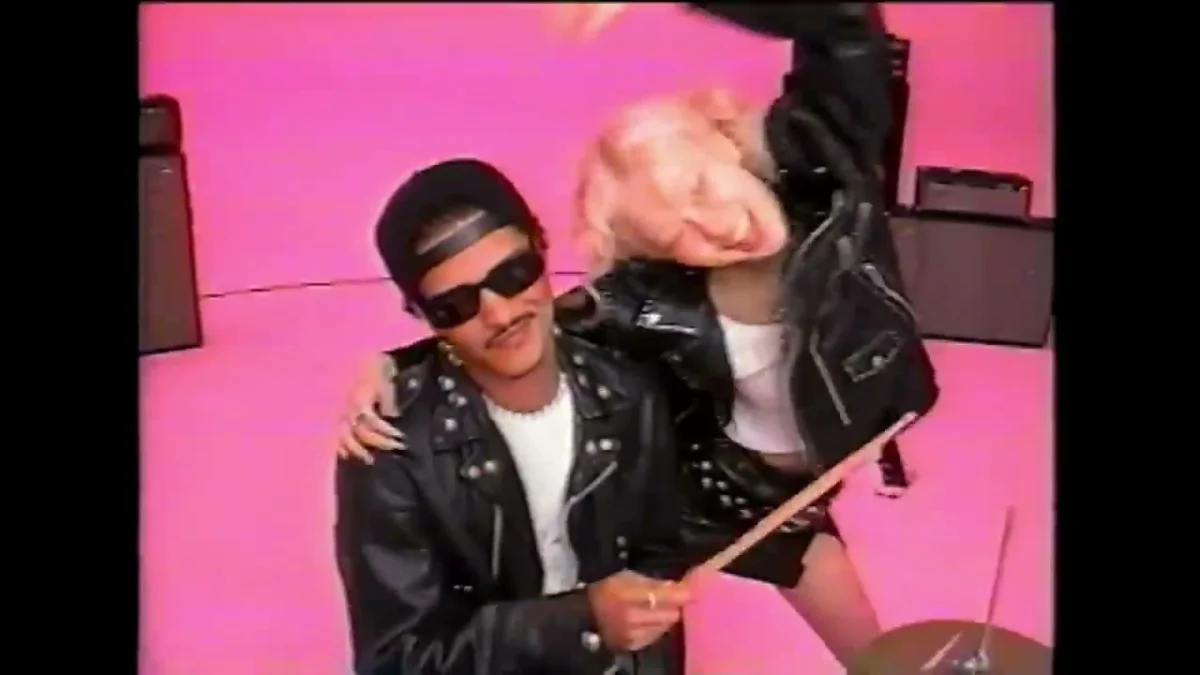
Two people take the places of the performers in an APT. dance clip, but the camera keeps cutting between them. To make an APT AI video people can follow, cast each role clearly, then edit the finished clip so the opening frame and caption make the pairing obvious. The joke needs two recognizable people, not two mystery faces.
Give the duet a reason to exist
The APT. template on Trendai uses two photos and keeps each person in a separate performer role across the cuts. Its source preview runs 22 seconds, with a pink studio, drums and quick changes in framing. That is a lot of information for somebody seeing your post without context. A pairing people already know, such as you and a friend who always tries to steal the aux, has an advantage over two random selfies.
Pick the relationship before picking the photos. Roommates competing for control of the playlist? Co-workers who have no business starting a band? A sibling duo where one of you is visibly more committed? Write down the premise in one line. If it takes a paragraph to explain, the edit will not rescue it.
Do not treat the two upload slots as left and right sides of the screen. Roles, not sides.
That distinction matters when the two performers switch positions between cuts, and a viewer who was looking for one person on the left suddenly has to work out who is who all over again. The people move between positions when the reference cuts, so a caption like “me on the left” can be wrong a moment later. Introduce them by name or role instead. Small fix. Much easier to watch.
Cast for recognition across cuts
Choose a front-facing picture of each person, with one face in each file. A busy party picture is tempting because it has personality, but another face in the background can make the casting muddy. Use photos where the hairline and face are visible; save the funny expression for the text overlay. Ask the other person before using their photo, especially if the result is headed for a public account.
The template source preview shows performers in black jackets against a pink background. Clothes from your selfies are not the punch line here. Recognition wins. Simple. If one person photo is a dark mirror shot and the other is a bright headshot, replace the mirror shot rather than trying to color-correct the exported video afterward.
Watch the first pass for continuity, not polish. Can you identify each person at the start, after a close-up, and when they are near the drum kit? If one face gets lost when a hand crosses it, do not freeze that frame for your cover. Find the moment where both read immediately. For this particular duet, a clean two-shot beats the funniest solo frame.
Make the first second do the introducing
You do not need to cut a miniature trailer before the duet. A short line of on-screen text at the start can do it: “When my roommate gets the aux” or “We said one karaoke song.” Put the two names in the post caption if the faces are not familiar to your audience. Keep the setup short enough to read before the first quick cut.
After generating, view the export at phone size with the sound off once. That is when you notice text covering a face or disappearing against the pink wall. Move it into clear space, and check it again on a later shot. A line that fits above two heads in one frame may land over sunglasses in the next. If an editor offers text timing, let the setup disappear once the duet is underway rather than leaving it pinned across every cut.
Do not insert a hard cut right before the drum moment just to hurry the clip along. The fast edits already supply pace; another cut can make it look like one person identity switched. If you are going to shorten anything for a separate social edit, review the join with both people in mind. The instant before and after should still read as the same pair.
Post the result without pretending it is footage
An AI performance with real-looking people is still an AI performance. Caption it as an AI duet, and check each platform disclosure setting when you upload. YouTube own guidance says creators must disclose realistic AI alterations that make a real person appear to do something they did not do; its upload flow provides an “AI use” field. That rule matters if you cross-post the video to Shorts. It is not a substitute for asking the people in the photos first.
Choose a cover where the premise is visible: both performers in frame, enough of the pink set to signal the APT. bit, and no tiny caption crammed across a face. A screenshot of a blurry mid-spin looks like a rendering error on a profile grid. Open the file at thumbnail size before you commit. Try it. Tiny test. Big difference.
If you want another two-person setup after this one, the Hotel Lobby duet guide breaks down a steadier stage and simpler blocking. Here the pleasure is the opposite: two people staying legible while the camera refuses to sit still. Keep your opening label on long enough for a stranger to meet both of them.