How to Make a Gamer Apocalypse Swap AI Video
How to make a Gamer Apocalypse Swap AI video with one portrait, check the 19-second 4:3 disaster scene, and post it as a fictional fan edit.
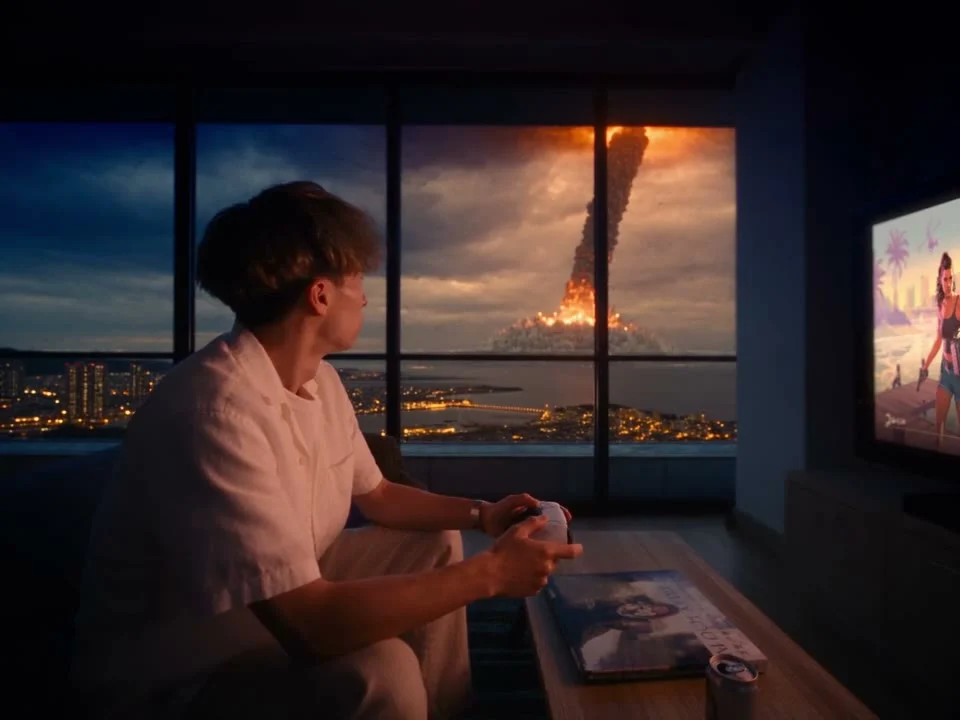
Gamer Apocalypse Swap turns the GTA 6 release joke into a living-room disaster scene: your character keeps playing while the world outside the window falls apart. To make the video, upload one clear photo of yourself, place your face in the gamer’s role, then inspect the finished clip before posting it as a fictional fan edit.
The joke works because the room stays ordinary
The Gamer Apocalypse Swap template follows a source clip in which a gamer settles in with a controller as a meteor lights the skyline while smoke rises. A wave approaches the window. The person inside treats a world-ending event like a minor interruption. That’s the whole bit. Timing matters here. If your caption explains the apocalypse before viewers see the window, you’ve given away the punch line.
Its source preview is reference footage, not a personalized generation. The poster catches a gamer on a couch looking toward an orange blast beyond large windows, with a television still on at the right. It is a still. It gives you the composition, not evidence that your face will hold up in each cut. That distinction matters here because the joke needs the person and the approaching disaster in the same visual world.
This isn’t another glossy GTA-inspired character portrait. The GTA 6 Loading Screen photo guide is about making a single painted still; this template recasts the gamer in a moving, disaster-in-the-window scene. Choose the still if you want profile art. Choose this one if you want the deadpan reaction to do the work.
Cast the gamer, not the disaster
The live form asks for Your photo: one person. It’s one required image, not separate uploads for the controller, the room or the event outside. A single person’s face and upper body should be clear and evenly lit. Keep the face unobstructed. The form accepts JPG, PNG or WEBP; check the current upload limit in the form instead of relying on an old screenshot.
Pick a photo that could plausibly belong on that couch. A front-facing or slight three-quarter portrait with visible shoulders gives the recast a better starting point than a tiny full-body group shot. If a friend is leaning into the frame, crop them out before uploading. The model shouldn’t have to guess which of you is supposed to ignore the meteor.
Watch the lighting mismatch. The source scene is dark indoors, with a bright orange event outside. A clear photo taken in soft light gives the system facial detail to work from; a dim selfie already full of noise won’t magically become more legible when the scene cuts darker. You can choose a photo in casual clothes if that’s the character you want to project, but treat wardrobe continuity as something to check in the result, not a promise from the poster.
Only use your own image or one from an adult who agreed to this specific AI edit. Don’t cast a stranger or a public figure as the oblivious gamer. Permission is a better starting point than an awkward takedown request after the clip circulates.
Make the clip and inspect the moving parts
The live Gamer Apocalypse Swap form labels the source format 19 seconds, 4:3, source audio and offers 480p or 720p in its visible resolution control. It describes one uploaded person replacing the gamer. That 4:3 frame is wider than the vertical short-form canvas you might normally fill, so don’t assume a center crop will preserve both the window and the face. The television can disappear too.
- Upload a single portrait of the consenting person. Make sure the face and shoulders are visible before moving on.
- Check the resolution choice and the credit amount shown in your session, then generate from the template.
- Play the resulting file all the way through. Look for a recognizable face when the gamer turns, a believable grip at the controller and a stable silhouette when the bright window sits behind them.
- Listen to the export separately. The page describes source audio, but its reference clip doesn’t prove what your generated download actually contains or what rights you have to use that sound on a platform.
A good review pass should pause at the shot where the face turns toward the window and again where the controller is prominent. If either shot looks wrong, try a less angled, better-lit input photo rather than hiding the problem under a fast cut. Check the hairline and sleeves too. Small jumps stand out. They’re easy to miss while you’re staring at the meteor.
Don’t crop first and hope later. Test both frames. If you’re making a vertical version in a posting editor, test the beginning and the outside-window reveal on the phone screen. Keep enough of the room to establish that the gamer has noticed the danger and is staying put anyway. If a vertical crop loses the event outside, use a background or letterbox treatment that preserves the full 4:3 shot; a giant face with no disaster isn’t the same joke.
Post the absurd choice, not a fake event
A short setup like “GTA 6 finally loads and this happens outside” tells the viewer where to look without claiming the footage is real. The actual punch line should land when the player refuses to leave the couch. Keep the on-screen caption out of the window area if that’s where the threat becomes readable. Check it once with your phone’s interface overlaid; platform buttons can cover the very thing the caption points at.
Treat this as an independently made, fictional GTA-inspired fan edit, not a Rockstar announcement or gameplay capture. Don’t use an official logo or imply an endorsement. If the source or export has a recognizable soundtrack, confirm you can post it or replace it with audio licensed through your posting platform; never assume the template’s source-audio label grants music rights. Label the video as AI-generated where the platform requires disclosure, and don’t present the meteor or wave as footage from a real emergency.
For a last check, mute the video and show it to someone who hasn’t heard your setup. If they can see the gamer staying seated while the world outside changes, the visual joke survives a silent scroll. If they ask what happened, revisit the framing before adding more words to the caption.