Champagne Smash AI Video: Make the Impact Count
Make a Champagne Smash AI video from one identity photo. Learn what the optional bottle upload changes and how to post the staged celebration honestly.
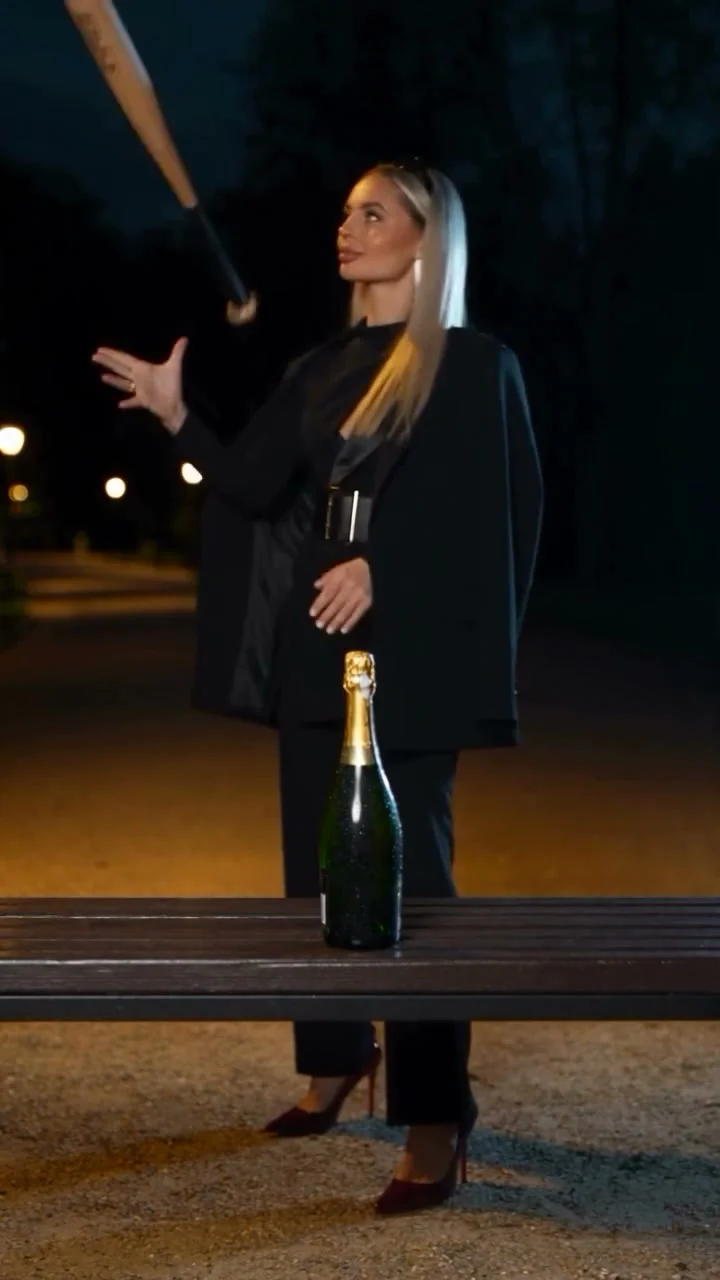
A champagne bottle sits on a wooden bench. Someone in black swings a bat, and the celebration ends in a spray of liquid. The Champagne Smash Celebration AI video puts your face into that 12-second nighttime scene; one identity photo is required, while a second view of the same person and a replacement bottle image are optional. It’s a staged edit, not event footage.
The three upload slots have different jobs
The Champagne Smash template starts with one required identity photo. That photo supplies the featured person’s face and hair; eyewear carries over too. The black outfit and nighttime setting come from the source clip, along with the bat and bench. Don’t choose your upload for its party background; choose it because the face is clear.
The second person-photo slot is optional, but it isn’t a guest list. Same person, different view. It can help the likeness hold through the swing. Uploading your friend there won’t put the two of you at the bench. There is only one featured performer in this scene.
The third slot is for a bottle image. No upload? The template uses the included champagne bottle. Your own product image replaces it. A clean image showing the full shape gives the generator more to work with than a cropped neck and a blurry label. Even then, inspect the result: AI video isn’t a reliable way to reproduce tiny label text exactly, especially once glass and liquid start moving.
If you’re making a post for a brand, don’t imply that a real limited-edition bottle was destroyed unless it actually was. A stylized campaign can be fun without pretending it’s documentary footage. Get permission for anyone whose face you use and make the AI nature of the edit clear when the context could mislead viewers.
Build the setup around the impact
The source sequence has a simple order: the bottle goes on the bench, the person gets the bat, then comes the strike and splash. That’s the story. You don’t need to paste a new one over every second. A short line before the impact gives the visual room to do its job.
For a personal milestone, try a setup like “the group chat after we finally booked the trip.” For a bottle brand, focus on the occasion or mood rather than a false product claim. “When the launch date finally lands” works as a celebration cue without promising that your actual packaging will survive the effect frame for frame.
Keep any on-screen text away from the bottle during the setup. Let it register. Then get out of the way. A huge text box over the spray turns the whole point of the edit into a background animation.
I’d use this as a playful social post, not a product detail ad. The explosion is the hook, but a buyer trying to read a label or check the bottle shape needs a separate, real product shot. Show the real bottle. Put that genuine image in another slide or follow-up post. The AI clip can introduce the mood; it shouldn’t be the only evidence of what you’re selling.
Generate the clip and check its weakest frames
- Open the Champagne Smash Celebration generator and upload one clear photo of the person who will appear. Avoid heavy filters and face-covering accessories unless you want those features to carry over.
- Add a second view of that same person only if you have a useful one. If the bottle matters to the post, upload its own image in the separate bottle slot; otherwise leave the included bottle in place. Check that you haven’t mistaken the optional identity slot for a second character.
- Select 480p or 720p and check the displayed cost before generating. The live form fixes the video at 12 seconds in 9:16, with source audio. Preview the generated video with sound, not just the still cover.
Pause as the bat approaches the bottle. Does the hand keep its grip? Does the bottle remain on the bench until impact? At the splash, watch for a face that shifts or a label that turns into unreadable decoration. Those are the frames viewers may replay. Don’t promise exact packaging fidelity based on the source preview, which shows the original reference rather than a personalized result.
The optional images don’t add characters or change the fixed runtime. If the likeness looks off, first try a sharper identity photo. Bottle looks wrong? Test a cleaner image with the whole object visible. Don’t assume bumping resolution alone will fix a poor source image.
Publish a celebration, not a fake demonstration
The result uses the reference performance and audio, so listen before placing another track over it. A second sound can bury the impact that makes the moment work. If you add platform music, check the rules for your account and region rather than assuming the clip grants music rights for every use.
For a brand, label the edit as AI when required by the platform and avoid describing the splash as a test of bottle strength, safety or taste. No actual product test happened here. That matters more when your caption sounds like an endorsement or a customer review. See the AI UGC ads guide for the same distinction in testimonial-style posts.
If you’re posting for a birthday or graduation instead, the caption can simply say it’s an AI celebration edit. Share the milestone, not an invented night out. Before you publish, watch the downloaded file once on your phone: the face should stay recognizable before the swing, and any caption should leave the bottle visible long enough for the smash to land.