How to Make a Don't You Dare Christmas AI Video
Make a Don't You Dare Christmas AI video from two photos. Cast the gift-carrying black coat and the grey coat in a 29-second snowball story.
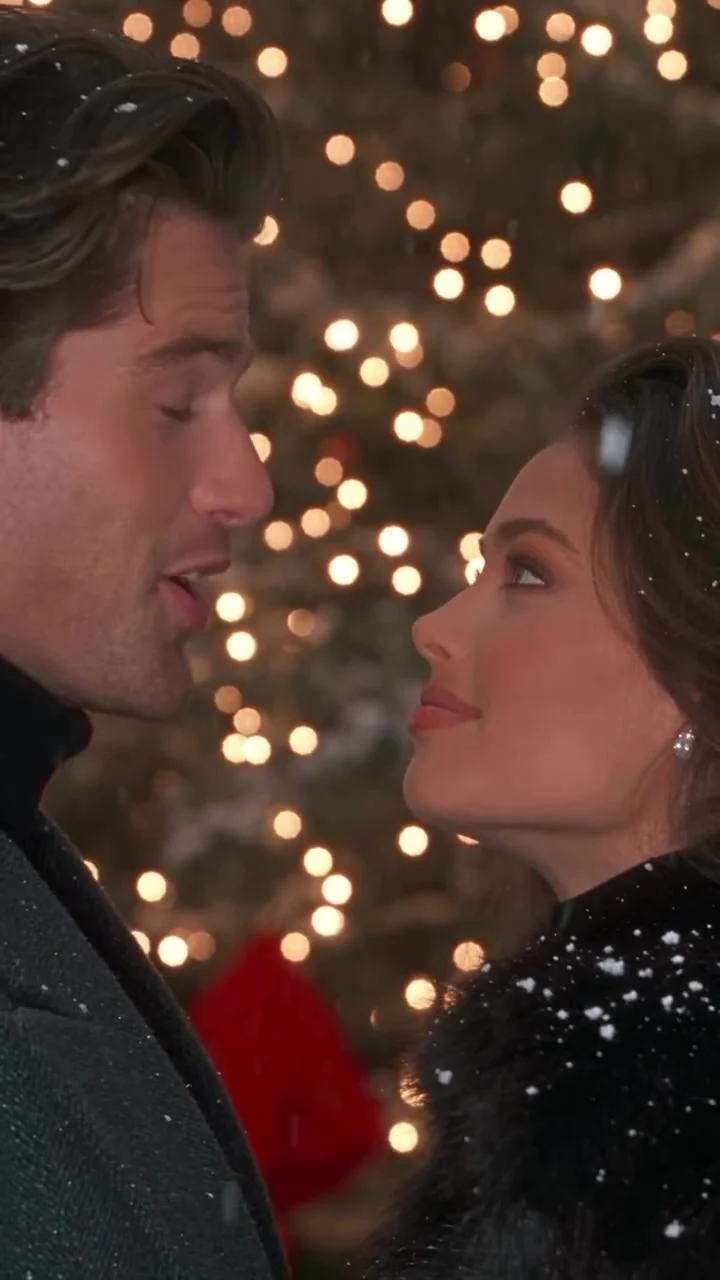
Two people walk through a snowy Christmas plaza with a stack of ribboned gifts. One starts a snowball fight, the other gives chase, and the scene ends with them face to face under the lights. To make the Don’t You Dare Christmas AI video, upload one photo for the black-fur-coat role and another for the grey-overcoat role. The template follows a 29-second vertical 9:16 source clip.
This is a little holiday rom-com, not a single-photo face swap. The joke in the title works because the gift-carrying walk turns into a chase. Switch the first slot, and you’ve switched who starts the fight. It changes the joke.
Cast the two coats before picking photos
The first required photo slot casts the person in the black fur coat. That character carries the gift boxes and starts the snowball fight. The second required slot casts the person walking alongside in the long grey overcoat, who then chases after. Two people. Two roles. These aren’t two angles of the same face. You can put yourself and a partner in the scene, or make it a playful edit with a friend who wants to be in it. Either person can play either role.
Don’t choose photos by coat color. The source supplies both coats, the red-ribboned gifts, the snowy plaza and its holiday lights. Your uploads identify the people. That’s it. A clean portrait of each face is more useful than a full-body photo where both faces are tiny. Pick one person per image, with the eyes visible and a similar level of light in each photo. Skip sunglasses. Heavy face filters also make it harder to recognize who’s who once the camera starts moving.
The poster shows the pair close together beneath warm lights, but it is a source preview, not a generated example with your photos. The first photo’s person may occupy the right side of that particular close-up; use the form’s coat labels to assign the roles, not one frame of the poster to guess the order.
For a darker two-person seasonal scene, the Halloween Haunted Mom guide assigns its pair to very different roles.
Make the snowball story
- Open Don’t You Dare Christmas on Trendai. Add a clear photo of the person who will carry the gifts in the black fur coat to Person 1.
- Add a different person’s photo to Person 2. This person takes the grey-overcoat role. Check both thumbnails before you generate; swapping them changes who starts the snowball fight.
- Choose 480p or 720p in the resolution menu. The form shows 480p as its default and displays the credit cost before generation. The video length and vertical frame aren’t separate choices on this template.
- Generate the clip, then watch the full result before downloading or posting. Don’t judge it from the first romantic close-up alone. The gift walk, the chase and the final meeting under the lights all need to hold together.
The live form currently asks for both photos. Its preview shows the source footage following the original camera moves and timing, rather than an output already made from your uploads. If a lower section of the page describes a different upload limit, follow the form you actually submit. No need to resize a photo to an arbitrary number from an old instruction paragraph.
Watch the fast turns, not just the opening
A good first frame can hide a wobbly middle. Watch the chase. In this clip, snow falls across faces as the two people move through a lit plaza. Then they run. Snow flies. At the end, they meet again beneath the lights. Look at each face before and after the chase. Does the black-coat character still resemble photo one when the gifts leave the center of the shot? Does photo two’s person remain identifiable in the grey coat when the camera closes in? If not, try sharper, more evenly lit portraits before changing the casting.
Keep the gifts and wreath in mind when framing a post. They establish Christmas before a viewer hears anything, so a tight crop on only one face could make the first seconds feel like a generic couple edit. The 29-second reference is vertical 9:16 already; you shouldn’t have to force a horizontal clip into a phone frame. Still check the final export inside your posting app, especially if you add a caption over the lower part of the picture.
The template page describes source audio, but don’t promise a particular soundtrack or vocal detail in a finished generation without listening to your actual export. Listen first. Use music you have permission to post on the platform where you’re sharing. A caption such as “Who started the snowball fight?” gives the scene a simple hook without pretending the video documents a real holiday outing.
Post it as a Christmas scene, not a real memory
Send the draft to the other person before publishing. Their face is in a fictional snowy romance and chase, so consent matters even if the edit is cute. If you’re posting from a brand or couple account, label the AI-made nature of the scene where the platform asks you to, and don’t imply the two of you actually filmed this under the city lights.
For a short teaser, open on the gift boxes or the moment the snowball fight begins, then let viewers discover who gets chased. For the full clip, give the final face-to-face beat room to land. If you replace the original audio with a holiday song, check the platform’s music rights for your account and territory before scheduling the post.