How to Make a Dimitri Finds Out AI Video
Make a Dimitri Finds Out AI video with the right one-person photo, then check the interview, dance, horizontal crop and source audio before posting.
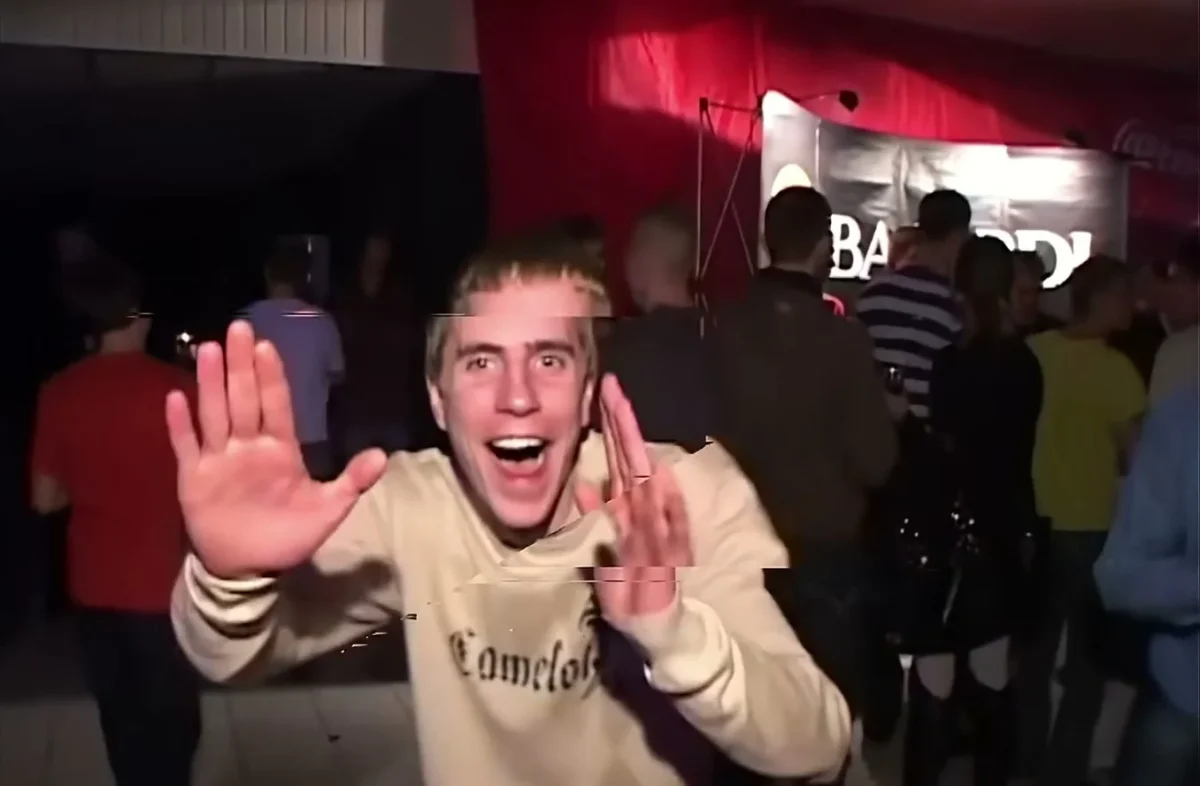
The Dimitri Finds Out AI video puts one person into the dancing guy’s role in the Russian club interview: first the reporter approaches, then the interviewee reacts and dances toward the camera. Use a clear photo of the person you have permission to depict, keep the reporter out of your upload, and check the face again when the hands start moving.
The interview is the setup, not dead time
The joke needs its opening. In Trendai’s source preview, a reporter leans toward a young man in a beige sweater before he launches into the club dance. If you cut straight to the waving hands for a teaser, people who know the meme will get it, but new viewers lose the switch from awkward interview to total commitment. Let the setup breathe.
The template page identifies the source as the Russian club interview called “Очень плохая музыка” (“Very bad music”). Its 19-second reference clip is footage the generation follows, not an example of someone else’s finished face swap. The handheld crowd and the reporter’s microphone are part of that visual grammar. Your job isn’t to stage a second club photo. It’s to choose whose face can survive the move from a relatively still exchange to a close, fast dance.
There’s a funny contrast here: a deadpan face at the microphone can make the sudden dance land harder than a posed party selfie. Pick the photo for the first beat and the last one, not just the thumbnail.
If you want the person to perform throughout rather than emerge from an interview setup, see the Bulin 47 Freestyle guide.
Cast the one upload slot correctly
The live form calls the required upload “Your photo” and assigns it to the dancing guy. There is one file slot, for one person. The uploaded person takes the young man’s place; it does not cast the reporter or replace every face in the crowd. The form asks for a clear face. It also says your hair, facial hair and earrings. Usually your outfit carry into the new video. “Usually” matters. Clothes can drift when hands cross a torso.
Use an upper-body portrait with both eyes visible and some room around the shoulders. A bright kitchen photo can work even though the scene is dark: the generator needs clean information about the face more than it needs a fake club backdrop. If the only photo you have has one cheek buried in shadow, a flash glare across the glasses or another person’s face right beside yours, find a different one. Don’t make the software guess which person is supposed to be dancing.
Choose clothes on purpose. A plain top gives the moving hands a readable edge against the body, while tiny patterns can turn into noise in a low-light clip. Don’t photograph yourself already covering your mouth, either. That pose competes with the reference’s interview reaction, where the mouth and eyes do a lot of the work.
Ask before using someone else’s photo. A friend’s face inserted into an existing interview can look like footage of them speaking on camera, even if your caption meant it as a joke. Get their okay for the specific edit and for posting it.
Make the clip and inspect the hard frames
- Open the Dimitri Finds Out template and upload your one-person portrait to the required dancing-guy slot. Don’t upload a picture of the reporter to try to swap her instead.
- Look at the form’s format before generating: it currently shows 19 seconds, horizontal, source audio. Its visible resolution default is 480p, with 720p also listed. Check the displayed credit amount at the point of generation rather than assuming a price from a screenshot or an old post.
- Play the result from the interview through the dance. Pause when the reporter leans in, when the interviewee turns his head and when a hand passes in front of the face. If the jaw changes shape or the face turns into a different person, don’t post that take as if it were a clean likeness.
The source preview plays muted on the page, but the form says the delivered clip uses source audio. Those aren’t the same thing. Listen to the downloaded result before adding a separate track; don’t promise followers a fresh voiceover when this template is built around the original sound. The page also says the popular upload’s burned-in subtitles are cropped out, so don’t rely on captions being baked into your file.
This is a wide video. Before putting it in a vertical feed, preview the crop in the actual composer: a center crop can hide the reporter at the start or slice off a waving hand later. If the app gives you room for a blurred background or letterbox treatment, preserve the full interview-to-dance action instead of forcing a tight face crop. Browse other trends if you really need a native vertical scene.
Post the payoff without pretending it’s real
A caption that frames the gag works better than a claim that you found lost footage of yourself at a Russian club. Try an everyday prompt tied to the reversal, such as “Me saying I won’t dance tonight,” followed by the clip. Keep the setup visible so the dancing feels like the punchline. The caption is your writing, not something the template generates.
Label the video as an AI edit or fictional face swap where your platform’s disclosure controls call for it. If you used another person’s likeness, get permission before sharing and avoid suggesting they attended the interview or said the audio’s words. The original footage includes real people who are not your cast. A joke can still be clear about what happened: you placed a consenting person’s image into a reference scene.
Check the uploaded post once it is live, especially the first frame and the crop shown in the feed. If the microphone disappears from that frame, select a cover frame that establishes the interview; if the app trims the wide clip too aggressively, repost with more breathing room rather than burying the setup. The dance doesn’t need extra speed. The hard cut in the person’s attitude is the bit.