Bulin 47 Freestyle AI Video: Keep the Face in the Shot
Make the Bulin 47 Freestyle AI video from one face photo. Check the handheld crowd shot, original soundtrack and lip movement before posting.
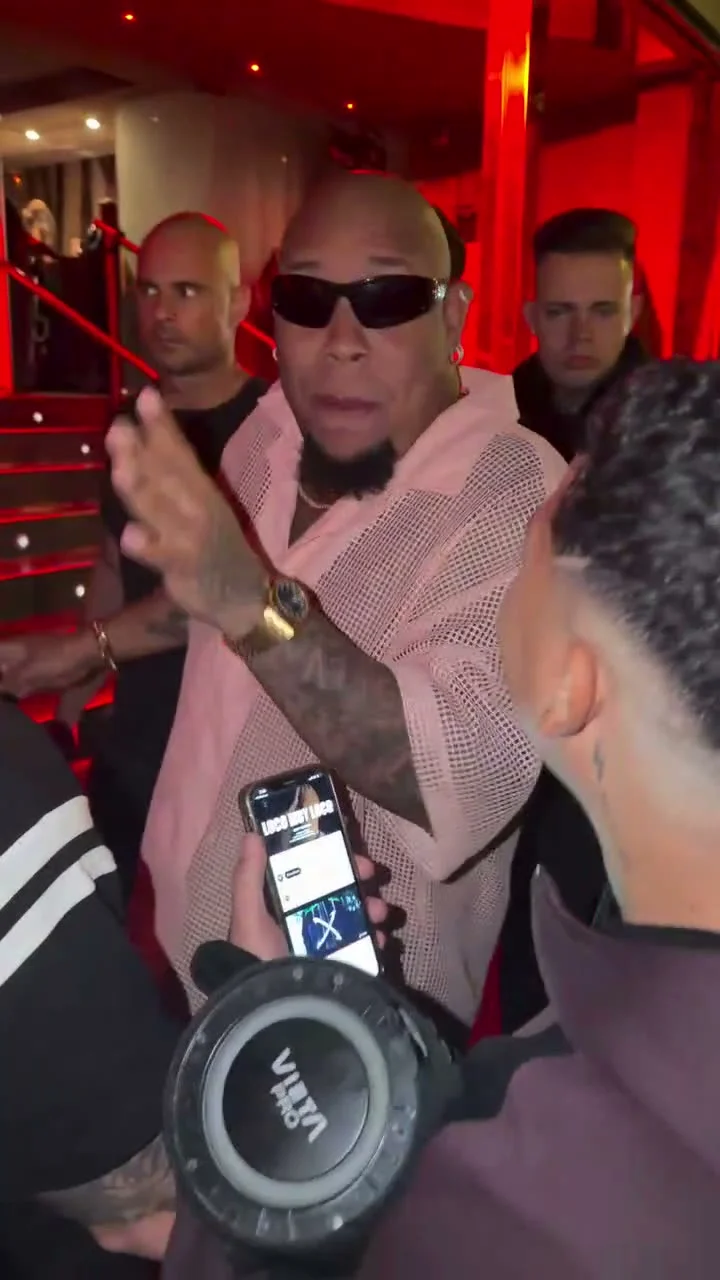
One rapper in a pink shirt works a red-lit room while phones crowd the frame. The Bulin 47 Freestyle AI video template puts your face in the main performer’s place for that continuous handheld take. Upload one clear photo, then check the turns and mouth movement before you post the 30-second vertical result.
This isn’t a blank rap-video generator. The verse, camera path and crowded venue belong to the source clip. No new stage. Your job is to choose a photo that can survive moving through the room without turning the performer into a different person halfway through.
Cast the main performer, not the whole room
The live upload form asks for one required photo of the main performer. It replaces the person rapping toward a man holding a phone and portable speaker. The man and the bystanders stay in their roles, though the generation may redraw small details. Only one lead. A group selfie won’t give the system a clean answer about who is supposed to take center stage.
Use a sharp, well-lit photo of one person. Keep the face visible and choose a shot where the hair and any facial hair are easy to read. If you wear glasses in the photo, they can become part of the look; the source performer wears wraparound sunglasses, but don’t expect that accessory to transfer exactly to your version. The template says your outfit usually follows the uploaded photo, so pick clothes you actually want in the video. A chest-up shot gives the face room while still showing enough shirt to guide the look.
Avoid a phone covering the mouth. It’s tempting to use a mirror photo because the scene is filmed like a spontaneous phone clip, but that prop will only confuse the image the generator uses to identify you. Keep your mouth visible. Save the phone for the crowd in the source footage.
Use your own photo or one you have permission to use. This template swaps a likeness into recognizable performance footage; don’t imply the person in your generated version recorded the original verse or performed at that venue.
Follow the handheld shot
The reference preview on the template page is source footage, not a generated example with somebody’s upload. It shows a rapper near a staircase in a red-lit venue, facing a man with a speaker while people around them film. The camera pushes through the crowd and stays handheld. There isn’t a fresh scene to invent for each line.
That choice gives the edit its energy, but it also exposes bad identity swaps. Watch the first push through the crowd, then the moments when the face turns away and back. Does the jawline return as the same person? Do glasses or facial hair blink in and out? Pause a close frame. A convincing opening doesn’t rescue a face that changes when the rapper turns.
The original mouth movement and soundtrack are carried over as the intended match. Your photo doesn’t record a new voice and it doesn’t rewrite the lyrics. No fresh verse. The page specifically warns that likeness and lip sync can drift in the dim lighting or during fast movement. Check the actual render with sound before calling it a performance clip; the poster alone tells you nothing about timing.
Generate and check the 30-second edit
The form shows a fixed 30-second vertical 9:16 video with source audio, plus a choice between 480p and 720p. The live form’s upload guidance is the one to follow if a lower-page instruction gives a different file-size limit. Check the displayed credit cost at your chosen resolution before you generate; it may change, and the longer clip is not something to retry blindly.
- Open the Bulin 47 Freestyle template and upload a single, face-forward photo of the person who will replace the main performer.
- Choose the available resolution that fits your intended post and the credits shown in the form. Leave enough detail in the face for the quick head turns.
- Generate the video, then watch the full take with sound. Check the first crowd push, the closest face moments and the end of the clip.
- If identity drifts, try a different source photo with cleaner lighting and a less obstructed face. Don’t promise that a second generation will fix every lip-sync error.
For a TikTok or Reel, let the venue reveal itself before you add a busy caption overlay. A short caption such as “My turn in the freestyle circle” frames the edit without claiming you wrote or recorded the track. If you use the original soundtrack in a public post, check your platform’s music rules and any applicable rights first; the template preserving audio doesn’t grant a separate license for every destination.
The Gas Station Dance guide is useful if you want a multi-shot story instead. Bulin 47 is one crowded, continuous performance, so the main review question is simpler: does the same face hold from the first close pass through the last line? Watch that final turn at normal phone size, not just zoomed in on a desktop.