Cheba Man Techno Dance AI Video: Nail the Party Edit
Make a Cheba Man techno dance AI video from one photo. Choose a full-body shot, check the fast footwork and post the 16-second party edit clearly.
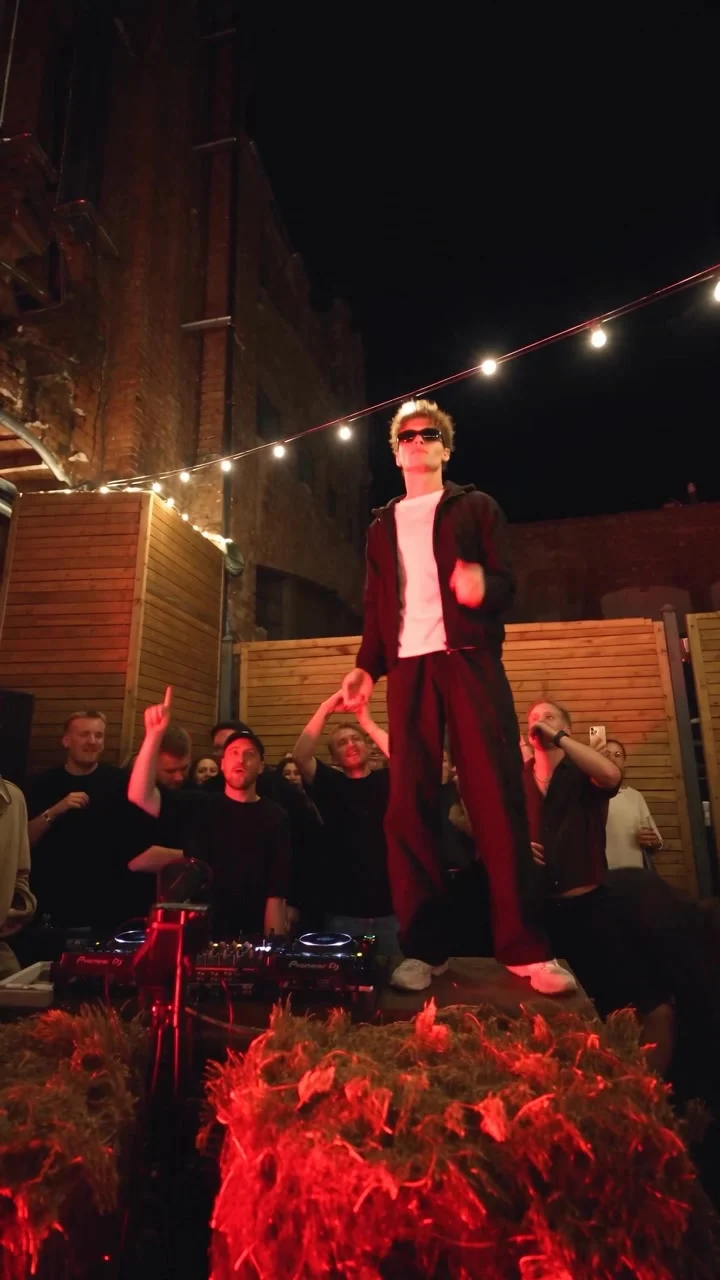
Cheba Man techno dance is the nighttime party clip with one dancer moving above a DJ booth while a crowd watches from below. To make a Cheba Man techno dance AI video, upload a clear photo of one person and use the template’s original choreography. The result is a 16-second vertical video with the source audio, not a recording of you at the party.
A solo dancer needs a photo with legs
This scene lives on the dancer’s silhouette. In the Cheba Man techno dance template, the source performer stands above the DJ booth under red light and string lights. You can see the feet. That’s important: the arm moves catch your eye first, but the quick steps keep the clip from looking like a floating torso.
Choose a photo where one person is visible from head to shoes if you have one. A front-facing pose with a sharp face gives the generator a better reference for identity; visible legs give it more to work with when the dancer steps across the platform. Not every photo needs to be a formal full-body portrait. A casual photo at a party can work if it isn’t dark enough to erase your features.
Keep other people out of the frame. The upload form asks for one person and says the face and outfit come from that photo. If you cut yourself out of a group shot, check the edges of the crop: a stray arm beside your shoulder can confuse who’s meant to dance. Skip that stray arm. Your sunglasses might look good in the original party shot, but a clear view of your eyes is a safer choice if facial resemblance matters.
The crowd is already there. Don’t build one into the upload photo or try to match its lighting exactly. Start with a readable subject; the red party lighting belongs to the video.
Make the first second earn the replay
The source preview opens on a crowded outdoor DJ setup. String lights overhead. DJ equipment below. The dancer is raised over the booth, so the audience needs a beat to recognize that the person up there is you; a caption that gives them a reason to look at the dancer works better than a wall of hashtags.
Try a short setup that makes the serious expression part of the joke: “me after saying I don’t dance.” For a friend, “the one who always says they’re leaving early” sets up the contrast before the footwork starts. Neither line needs to claim you really climbed a DJ booth. The edit is the punch line.
Don’t plaster a caption across the feet. The shoes need room. Place any on-screen line high enough that the audience can still see the raised platform and the moving shoes, but not so high that it covers the face. Watch the preview inside the app where you plan to post. Profile names and buttons can occupy part of a vertical screen, even when your export itself looks clean.
If you plan to reveal the source photo before the dance, give that still a brief moment, then cut directly into the movement. No slow fade. A long intro makes a 16-second dance feel late to its own party. You can also skip the photo reveal entirely when your friends will recognize you on sight.
Generate and inspect the moving parts
- Open the Cheba Man techno dance AI video generator and add one clear photo. Pick a shot that shows the outfit you want to carry into the dance.
- Choose 480p or 720p. The live form fixes the length at 16 seconds and the frame at 9:16, with source audio included; resolution is the choice you make before generation. Check the displayed credit cost before you commit.
- Watch the entire result with sound. Pause where the dancer throws an arm upward and during the fastest footwork. Look for a face that changes shape, hands that merge into the background, or shoes that lose contact with the platform.
Fast motion hides glitches. If something feels wrong, replay the move at normal speed first. Does the face still read as the person you uploaded? Does the outfit stay recognizable when the lighting turns red? A frame-by-frame oddity matters less than a whole second where the dancer looks like somebody else.
The template page identifies the poster and video as source previews, not personalized examples. Your result can differ from the reference in small ways, so check the downloaded MP4 itself rather than assuming the source clip shows exactly how your face will appear.
Post the party without claiming you were there
The source audio is already there. Avoid stacking a second track over it without listening to the finished edit; the original beat is what ties the angular arms and fast feet together. If you use platform music tools, check the music rules for your account type and region. Don’t assume a sound that plays in a template is automatically licensed for every use.
Get permission if the photo belongs to a friend. If the result could be mistaken for footage of them at a real event, say it’s an AI edit and use the platform’s available disclosure tools where required. That still leaves plenty of room for the joke. “My friend at the rave in an alternate timeline” tells viewers what they’re seeing without pretending it happened.
For a calmer one-photo dance idea afterward, the Storm Dance portrait guide takes a different visual route. For Cheba Man, let the raised booth and footwork stay visible right through the last beat. A close-up crop would throw away the part that makes this scene funny.