How to Make a Mesut Ozil Bounce AI Video
Make a Mesut Ozil bounce AI video with one character card, then check the 15-second stadium dribble for face drift and clean ball contacts.
The Mesut Ozil bounce AI video puts one character into a stadium dribble, not an entire new soccer match. Upload a single character card to replace the man handling the ball; the other players stay tied to the reference clip, as do the ball movement and source sound. Pick a card that can survive both a face close-up and full-body footwork.
Watch the ball, then decide who belongs in the shot
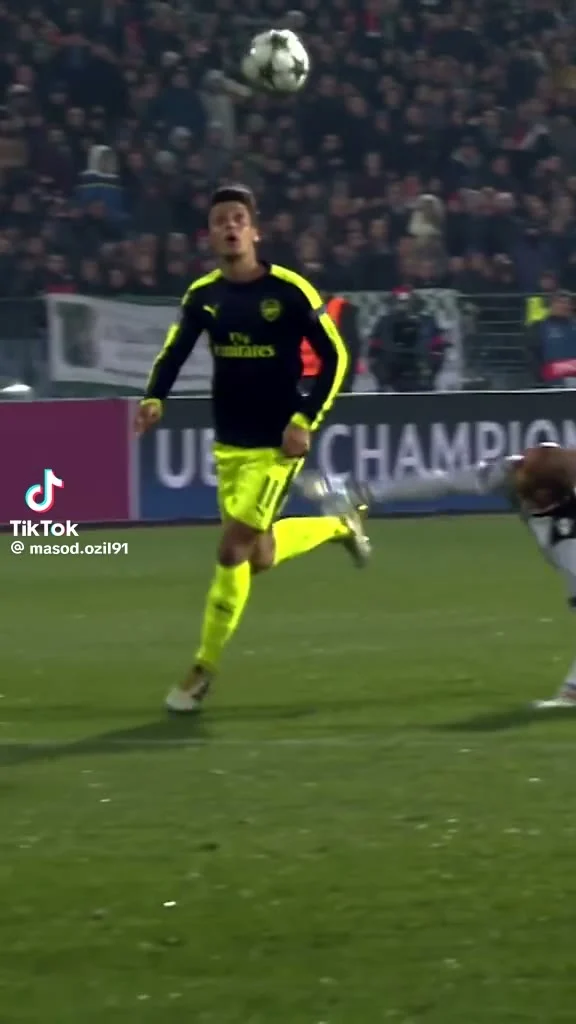
The Mesut Ozil bounce template follows a night-stadium scene: a man in an olive-green robe controls the ball while players in green close around him. The source is match footage, not footage of your character. The joke of the edit is that your invented character inherits that exact dribble without making the rest of the match look like a different sport.
There’s a catch worth noticing before you upload: the template doesn’t replace every person you see. Its live form assigns your card to the robed ball handler only. The uniformed players and goalkeeper remain from the clip. If your idea needs your whole friend group on the pitch, this isn’t the right edit. If it needs one absurdly dressed hero threading through a real-looking field, you’ve found your shot.
The preview is labeled as original source footage and runs 19 seconds. The live generation form, by contrast, specifies a 15-second vertical 9:16 video with source audio. Don’t promise a friend that every moment of the longer preview will show up in the finished cut. Watch for the movement. Then judge the generated 15 seconds on their own terms.
The Football 360° Spin & Shot guide is another soccer edit, but its camera move and ball action need a separate check.
Build one character card, not a cast list
The form has one required upload, labeled “Your character card.” No second player slot. It asks for one image of the same character, ideally shown from the front plus side and back on a single card. Same character. Three angles are useful, but three contestants for the ball are not. The form accepts JPG, PNG or WEBP; follow its displayed upload limit rather than the older how-to text farther down the page.
Give the front view enough space for the eyes and nose to register. Keep a complete body in the frame as well, with feet visible. A dramatic headshot might look great as a profile picture but provides little help when the character has to pivot around a soccer ball. If you make a three-view sheet, keep the lighting and outfit consistent across views so the side profile doesn’t appear to belong to somebody else. Plain backgrounds make the silhouette easier to read.
Avoid a crowded selfie or a card with three different faces. Those invite a character switch at the worst possible moment, usually when the ball crosses the legs. And don’t try to paint an exact robe onto the input and expect it to survive unchanged: the live template description says the output dresses your character in a burgundy blazer over a cream shirt, with checked trousers and curled-toe black boots. Your card supplies the identity and proportions; the costume is part of the gag.
For a real person’s face, get their permission first. A stranger’s match clip plus a familiar face can be misunderstood as actual footage if you post it without context. A fictional character card is a cleaner choice when you’re testing how far the edit can bend the scene.
Make the clip and check the contact points
- Open the exact Mesut Ozil bounce form and add your one-character card. Check that each view, if included, shows the same subject.
- Read the fixed length and format on the form before choosing resolution. It shows 480p by default and also offers 720p; the 15-second, vertical frame and source audio aren’t separate creative prompts.
- Generate, then review the downloaded result at normal speed and frame by frame around each ball touch. That first frame can fool you.
Start your review with the ball. Is it still near the correct foot or body part at the moment of contact? Then check the limbs when a player passes in front of your character. The coat-to-blazer change can be funny; a boot that turns into the soccer ball is just broken. Look for drifting jawlines in the quick turns and for a suddenly different character when the camera gets wider.
Pay attention to the audio, too. The form specifies source audio, so this isn’t a request to generate a new voice or soundtrack. Listen through the whole export before layering a caption, particularly if your post is built around a beat or a ball contact. Sound matters here. Don’t claim you’ve recreated a real match. You’re using a fictional character substitution over a reference scene.
If a card fails, fix the source image before writing a longer caption or stacking effects on top. A sharper face and one readable full-body view often give you a clearer diagnostic than another round of text. The fix starts in the image. This is a visual casting problem, not a caption problem.
Post the character reveal, not a fake highlight
The easiest hook is a name on screen just before the ball handler comes into view: “Who let [character] onto the pitch?” Replace the bracketed text with your own character’s name, then let the first dribble answer the setup. Keep the caption short enough that it doesn’t cover the feet. Let the boots show. They are doing more work here than your hashtag stack.
If the character is based on a consenting friend, tell viewers it’s an AI edit. If it’s invented, say that too. Avoid a thumbnail or caption that presents the substituted scene as an unreleased Mesut Özil match moment, and don’t imply Özil endorsed your version. The template’s poster is source footage with a visible player in a dark jersey and a ball above him, not proof of what your own generation will look like.
For a second post, show the character card briefly before the edited dribble, then freeze on the first decent ball contact. That gives people a fair look at what changed without pretending the game itself was filmed again. You can find other setups in the trends gallery, but this one works best when the card and the ball handler are obviously the same character.