Gemini vs ChatGPT for Halloween AI Photos
Gemini vs ChatGPT for Halloween AI photos: compare selfie editing, keep your face recognizable, and make a witch portrait that works in the feed.
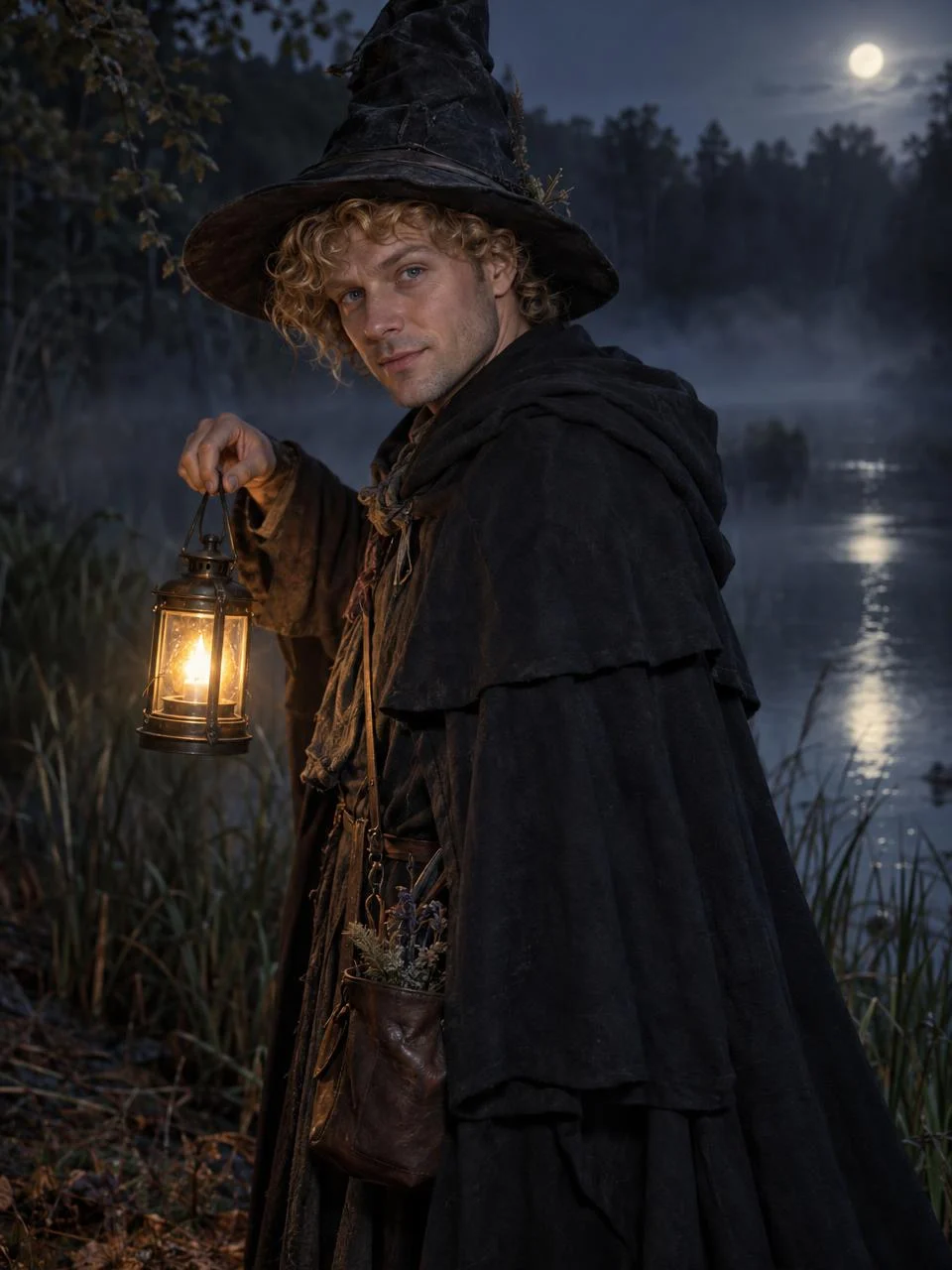
A Halloween AI photo needs to look like you in costume, not a stranger with a good hat. For a witch portrait, Gemini’s Nano Banana and ChatGPT Images both let you start with a real photo and describe the edit; a fixed style is quicker when you don’t want to keep rewriting the scene. The hard part is keeping your face while changing everything around it.
Pick the workflow before the costume
October makes every ordinary selfie feel like raw material for a costume post. But “make me a witch” gives an image model too many decisions: hat shape, time of day, pose, even whose face it should keep. Start smaller. Tell it to keep the person’s face and hair while replacing the clothes and setting, then inspect the result at phone size rather than admiring the whole scene on a large screen. Phone size is the test.
Google says its Gemini image editor was updated with a focus on maintaining a character’s likeness from one image to the next. That’s a design goal, not a promise that your chin or eye shape will survive every edit. Its announcement also says images created or edited in the Gemini app carry a visible watermark and an invisible SynthID mark. Check the current export before planning a clean edge-to-edge post.
OpenAI’s image-generation documentation describes an image-editing endpoint that can work from an existing photo, use one or more reference images, or take a mask to mark an area to replace. Those are developer-facing controls, not a claim that every ChatGPT screen exposes the same buttons. If you’re editing in the consumer app, look at the controls in front of you before building a whole shot list around selective masking.
If preserving a recognizable face is the hard part, the Nano Banana face-swap comparison looks at a narrower editing job.
Gemini vs ChatGPT for a witch portrait
| What you need | Gemini / Nano Banana | ChatGPT Images |
|---|---|---|
| Start from your selfie | Describe the costume and scene while asking the editor to retain your likeness | Upload your selfie and ask for a costume edit rather than a new person |
| Change only part of the frame | Make a narrow request, then inspect what else shifted | The OpenAI image API documents masks; don’t assume that control appears in every chat interface |
| Repeat the same character | Google’s editor explicitly targets likeness across images; still check every output | Reuse the same reference and specify the face details you need to keep |
| Get a fixed look without prompting | You still have to describe and judge the edit | You still have to describe and judge the edit |
Neither column is a lab verdict. This is about what you can ask for and what you need to inspect. A convincing costume portrait has a boring, strict test: would your friend recognize you before reading the caption? If not, start over. More fog won’t rescue it.
My call: keep the background modest until the face is right. A lantern reflected in water can look amazing, but if the edit moves your jawline, the viewer notices the wrong thing first. Build the costume around a recognizable portrait, not the other way around.
Build the shot from one usable photo
- Choose a clean starting frame. Use a solo photo where the eyes are visible and the face isn’t cut off by a phone or sunglasses. A busy group shot asks the editor to guess which person is the lead. For the Moonlit Witch style on Trendai, the live upload form specifically asks for one well-lit person with a clearly visible face.
- Lock what cannot move. In a freeform editor, try: “Keep this person’s face, hairline and expression. Change the outfit to a layered midnight cape and tall pointed hat. Put them beside a misty pond at night, holding a warm lantern. Keep the face readable.” That’s a suggested prompt, not a guaranteed output. If the face changes, shorten the request and make the edit narrower.
- Inspect the little failures. Zoom into the hand around the lantern handle and the edge where the hat meets the curls. Look for an extra finger, a merged sleeve, or an eye that has drifted away from the source photo. Those glitches are more obvious once the image fills a vertical phone screen.
- Crop for the feed before posting. Keep enough of the lantern in frame to explain the warm light on the face. If you turn a tall portrait into a wide cover, check that the hat isn’t sliced off at the top. The hat is doing actual storytelling work here.
If you don’t want to manage a freeform prompt, the Moonlit Witch Halloween photo style gives you the cape, hat, pond and lantern setup from one uploaded portrait. The live form specifies a single 3:4 portrait output, so plan the composition as an image, not as a moving clip. Its preview depicts a fictional person; upload only a photo you have permission to use, and don’t present the generated result as a real costume shoot.
Turn the portrait into a post without faking a shoot
Show the original selfie briefly, then cut to the witch portrait at the moment the lantern enters the viewer’s eye line. A simple before-and-after has a clearer payoff than a long sequence of random spooky filters. Let the face sit still. Viewers need a beat to compare it with the first frame, and a jump cut won’t hide a stranger’s nose.
Put the explanation in the caption: “AI costume portrait from my photo,” followed by the style you chose. If your platform asks for an AI-generated-content label, use it; don’t frame a generated pond scene as footage you shot. If you’re building a separate motion piece afterward, Trendai’s generator is a different starting point from the still-photo Halloween style, so check its input and output before promising a video reveal.
When a friend’s face is in the starting shot, get their consent before uploading or posting an edit of them. For a paired costume post, don’t assume a one-person witch style will preserve both faces: shoot and edit separate portraits, or choose a style whose live form actually accepts two people. The crop has one last trap. Leave room above the hat tip when you make the thumbnail; a clipped point makes the whole costume read like a black hoodie.