AI Influencer Indoor Dance: Use Both Photo Slots
Make an AI Influencer Indoor Dance video with two images of the same adult AI character. Set the face and body roles, then check the hand-to-camera move.
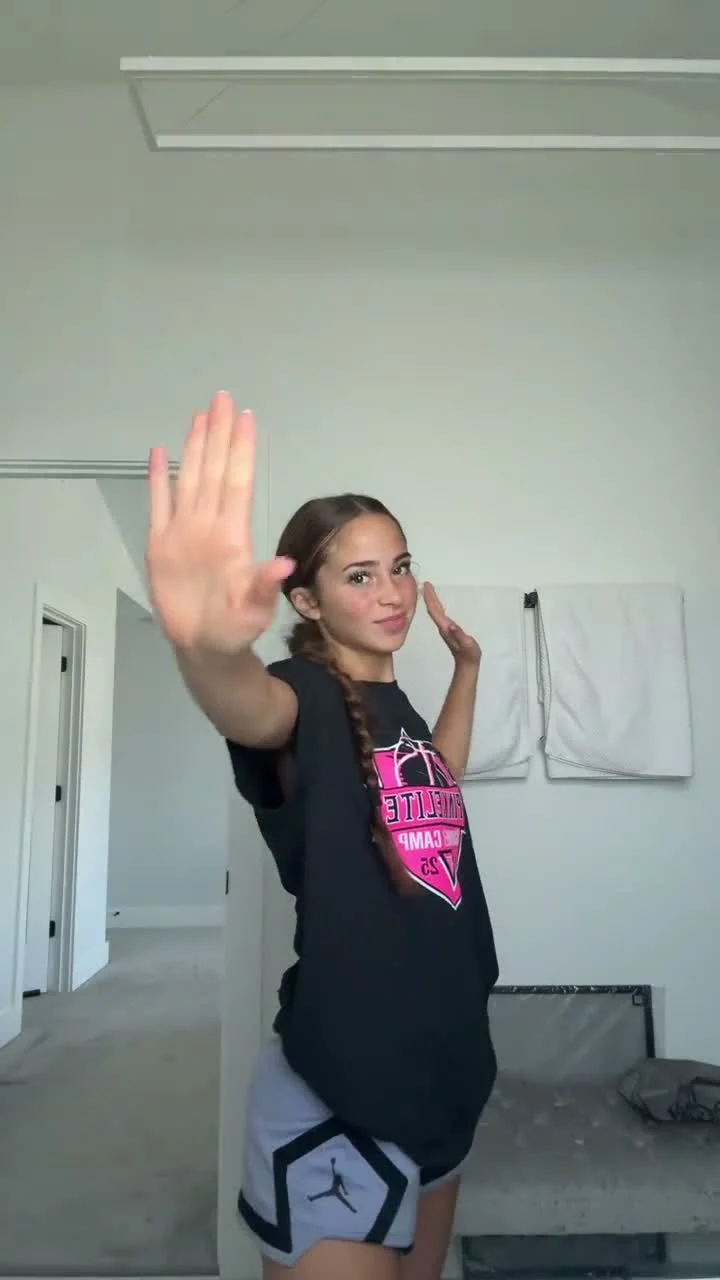
A woman raises her hand toward the phone camera, dances in a bright room and stays in one continuous shot. The AI Influencer Indoor Dance template lets you put an original adult AI character into that eight-second performance. You need two different images of the same character: a face portrait first, then an appearance and body reference. The clip supplies the clothes and the room.
Two uploads, one dancer
The AI Influencer Indoor Dance template has two required slots. The first is a front-facing face portrait that anchors the character’s identity. The second shows the appearance and body proportions of that same adult AI woman. It’s not a duet casting form. If you put two different characters into the slots, you haven’t assigned two parts; you’ve given the single dancer contradictory identity references.
Don’t upload the same file twice, either. The template page says the two slots require different images of the same woman and that duplicating a file is rejected. Make one image a clear face portrait and the other a view that actually shows her build. Before choosing the two references, compare them side by side at phone size: if the first portrait has a long chestnut braid but the body view has a short dark bob, a different face shape or a younger-looking version of the character, the generation has no reliable single identity to carry through the dance. Pick a matching pair. The mismatch gets obvious when the hand passes her face.
This template is designed for an original adult AI character you created or have rights to use, not photos of a real person. Keep it that way. If your character appears in a social post or an ad, don’t imply the clip documents an actual person dancing in that room.
Don’t style an outfit the clip won’t wear
The second image describes the character’s proportions, not her wardrobe. In the source reference, the dancer wears a black graphic T-shirt with light-colored bottoms in a bright indoor room. The generated edit follows that outfit and setting. You can spend time choosing an elaborate look for your body reference, but those clothes aren’t the outfit this template is built to show. Save that styling work for a template where the upload controls clothing.
There’s a more specific character constraint here, too. The generation instructions target green eyes, freckles, full lips and long chestnut-brown hair. A character with a very different design may drift toward that specified look even when the two uploads agree with each other. Before you commit to this dance, compare your adult AI character with the template’s intended appearance. If the difference is central to your character’s identity, choose another clip rather than assuming the references will override every detail.
You don’t need to manufacture a matching bedroom photo. The room comes from the motion source. In fact, a distracting background behind your body reference gives the edit information it doesn’t need. Let the face portrait be clear. Let the second image explain the character’s proportions. That’s enough material for the two assigned roles.
Check the hand-to-camera moment
The page’s preview is the original eight-second motion reference, not a result made with an uploaded influencer. It shows a single dancer doing playful hand gestures in a vertical phone-camera frame. When a palm comes close to the lens, it becomes the biggest shape on screen. The face can briefly fall behind it. That is where you should pause the generated video.
Look for the same person before and after the hand passes her face. Check the eyes and hairline when she turns, then inspect the fingers as the raised hand approaches the camera. A clean face at the opening doesn’t excuse an extra finger near the lens. Watch at normal speed as well as paused: the hand movement is part of the dance, not a still-image beauty test.
The template fixes the output at 8 seconds in 9:16, with 480p or 720p as the resolution choices. Keep the portrait crop when you post; a square cut can lose the raised hand or slice off the movement at the bottom of the frame. The source footage has audio, but the page says retention depends on the provider. Listen to the finished download instead of promising a soundtrack that might not be there.
Give the post an honest frame
This is a better fit for a recurring fictional character than a fake candid clip of a real influencer. A caption could point to the character’s dance break without claiming she was filmed in that room. Label the post as AI-made where the platform requires it. If you use the character for a campaign, keep any sponsored claim tied to what the brand can actually show, not a story about a person who doesn’t exist.
Before you share, play the export on a phone with your caption overlay visible. Keep text away from the face and the hand’s path; the gesture toward the lens is the shot’s hook. No room in the top half? Move the words into the caption instead. If the soundtrack is missing, pick audio you have permission to use on the destination platform and check whether it suits the timing of the hand moves.
For a party crowd and multiple cast roles, the Viral Club Dance Scene guide covers a different setup. This one is quieter: one original AI woman, two references, one room. Try the indoor dance template with a face portrait and a distinct body view, then check the close hand before it reaches your feed.